Google EDLA vs. Non-EDLA Interactive Panels: What Indian School Owners Need to Know in 2026
Understanding the Role of an Interactive Panel in Modern Classrooms

What Is Google EDLA?

What Are Non-EDLA Interactive Panels?

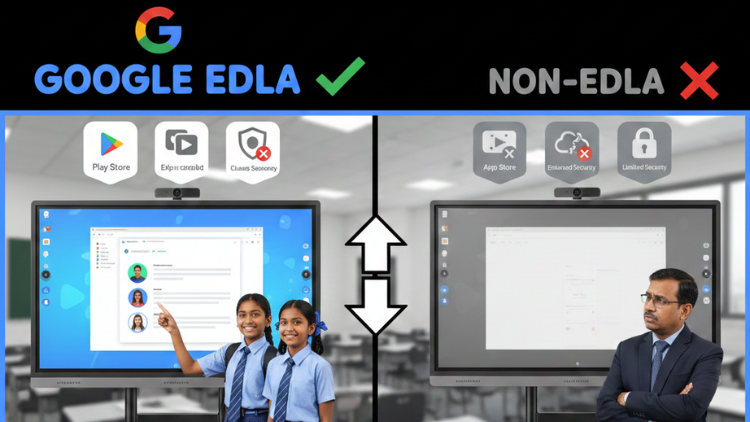
Key Differences Between Google EDLA and Non-EDLA Interactive Panels

1. Google Play Store Access
2. Software Updates and Security
3. App Compatibility and Performance
4. Cloud Integration and Digital Learning
Why This Decision Matters for Indian Schools in 2026

Better Student Engagement
Improved Teacher Productivity
Curriculum Support
Future-Ready Classrooms
Classroom Reality: How Teachers Use Interactive Panels

Practical Tips for Indian School Owners
- Prefer a Digital teaching board with Google Play Store for flexibility
- Ensure the Android version supports future updates
- Evaluate service support and warranty in India
Introducing Studynlearn Interactive Flat Panels

Studynlearn Interactive Flat Panels are among the best options for Indian schools looking for a cost-effective yet high-performance digital teaching solution. These panels are designed to enhance classroom learning with integrated K-12 digital content and advanced AI features.
They offer a 4K UHD display for crystal-clear visuals, supporting interactive and engaging lessons. With multi-touch functionality, multiple students can interact simultaneously, promoting collaboration and active learning. The panels come preloaded with educational content, making them ideal for various subjects.
Additionally, they include a 3-year on-site warranty, ensuring long-term peace of mind for schools. The energy-efficient design further helps in reducing electricity costs, making them a smart investment for schools.
Key Features of Studynlearn Interactive Flat Panels:
- 4K UHD Display: Offers superior clarity for immersive learning.
- Google EDLA: Certified with Google EDLA certification.
- Multi-Touch Support: Allows multiple students to interact simultaneously.
- Preloaded Educational Content: Ready-to-use, curriculum-aligned content.
- 3-Year On-Site Warranty: Ensures long-term reliability.
- Energy-Efficient Design: Helps reduce electricity costs.
Studynlearn AI – Personalized Learning for Indian Classrooms

Studynlearn has developed its own education-focused AI, designed to make teaching more efficient and personalized. Built by a dedicated in-house team, this AI offers step-by-step support tailored to the Indian curriculum. It provides instant lesson planning, quick topic searches, and even question paper generation, significantly reducing teachers' workload.
Key Features of Studynlearn AI:
- Curriculum-Focused: Provides step-by-step answers for Indian classrooms.
- Expert Development: Created by a 155-member in-house team.
- Multilingual Support: Available in English, Hindi, and regional languages.
- Instant Lesson Planning: Quick topic searches and paper generation.
- Vast Resource Library: Access to 6,50,000+ questions.
- Custom Content: Upload PDFs for personalized study materials.
- Fast Content Generation: Creates chapter-wise notes in three days.
Conclusion
Frequently Asked Questions (FAQs)
The main difference lies in software access and ecosystem support. Google EDLA panels come with official Google certification and provide direct access to the Google Play Store. This allows teachers to install trusted learning apps easily on the interactive panel. Non-EDLA panels do not include official Google support and often rely on limited app stores. For schools looking for a Next-gen interactive display with long-term reliability and smooth app performance, Google EDLA panels offer a more complete digital learning experience.
Indian schools should prefer Google EDLA panels because they support modern teaching needs and future-ready classrooms. These panels provide access to the Digital teaching board with Google Play Store, which allows teachers to use apps aligned with CBSE, ICSE, and state boards. Regular software updates, better security, and cloud integration make teaching easier. A Google EDLA-certified interactive flat panel for education helps schools match NEP goals and meet parent expectations for smart learning.
Yes, Non-EDLA interactive panels can suit Indian schools with limited budgets or basic digital requirements. These panels still function as an interactive panel for writing, screen sharing, and multimedia display. However, they lack official Google Play Store access, which limits app usage. Schools that want advanced digital learning, app-based teaching, and long-term scalability may find Non-EDLA panels restrictive. They work best for schools that prioritize affordability over advanced software features.
The Google Play Store allows teachers to download verified educational apps directly on the interactive panel. Teachers can use apps for quizzes, animations, assessments, and classroom management without external devices. A Digital teaching board with Google Play Store saves time, improves lesson quality, and increases student engagement. This flexibility turns the classroom display into a true Next-gen interactive display, supporting interactive and personalized learning for students across all grade levels.
Yes, Google EDLA panels receive regular Android updates and security patches. These updates improve performance, fix bugs, and protect student data. Regular updates ensure that the interactive flat panel for education remains compatible with new apps and teaching tools. Non-EDLA panels may not receive timely updates, which can lead to outdated software and security risks. For schools planning long-term use, update support is a critical factor when choosing an interactive panel.
Interactive panels support NEP goals by enabling experiential, visual, and technology-driven learning. Teachers use a Next-gen interactive display to deliver engaging lessons with videos, simulations, and real-time interaction. Google EDLA panels further enhance this by offering cloud access and app-based learning through the Digital teaching board with Google Play Store. This approach encourages critical thinking, collaboration, and digital skills, which are key focus areas of India’s evolving education system.
School owners should check software certification, app access, update policy, service support, and warranty. They should confirm whether the interactive panel includes the official Google Play Store. A interactive flat panel for education should support future updates and offer reliable after-sales service in India. Owners should also evaluate teacher training needs. Choosing the right Next-gen interactive display ensures better learning outcomes and avoids technical challenges in daily classroom use.
Yes, a Google EDLA interactive panel justifies its higher cost through long-term value. It offers better software stability, official Google Play Store access, and continuous updates. Teachers save time, students stay engaged, and IT issues reduce significantly. Over time, the efficiency and reliability of a Digital teaching board with Google Play Store outweigh the initial investment. Schools that aim for quality education and digital growth benefit more from a certified interactive panel.
Interactive panels reduce preparation time and simplify lesson delivery. Teachers access apps, lesson plans, and cloud content directly on the interactive panel. A Next-gen interactive display allows teachers to annotate, save lessons, and reuse content easily. Google EDLA panels further boost productivity by integrating Google tools smoothly. This ease of use helps teachers focus more on teaching quality rather than managing technology in the classroom.
For future-ready classrooms, Google EDLA interactive panels offer a stronger advantage. They support continuous innovation through apps, updates, and cloud integration. A interactive flat panel for education with Google certification adapts easily to new teaching methods. While Non-EDLA panels meet basic needs, Google EDLA panels transform classrooms into smart learning environments. Schools planning long-term digital growth should invest in a Next-gen interactive display that supports evolving educational demands.
Related post:
- Interactive Flat Panel for Classroom – Features Schools Should Prioritize
- Best Interactive Flat Panel for Classroom - How to Choose the Right One
- Interactive Flat Panel Price in India (Complete Guide)
- Studynlearn Launches India’s First Android 16 Interactive Flat Panel – The Future of Smart Classrooms
- Interactive Flat Panel 75 Inch - Best for Large Classroom Setup
- Why an Interactive Flat Panel is Cheaper than a Projector for Indian Classrooms: The 5-Year Cost Comparison
- Why Studynlearn Is the Best Smartboard for Teaching in India
- Best Interactive Flat Panel in 2026 — Top 3 Picks for Indian Classrooms & Offices
- Best Digital Board for Teaching: Comparison of Leading Brands
- Interactive Flat Panel Benefits for Teachers and Students