Podcast Setup: Create a Professional Podcast Studio for High-Quality Content
Interactive Flat Panels
September,28 2026
Mohammad Hamzah
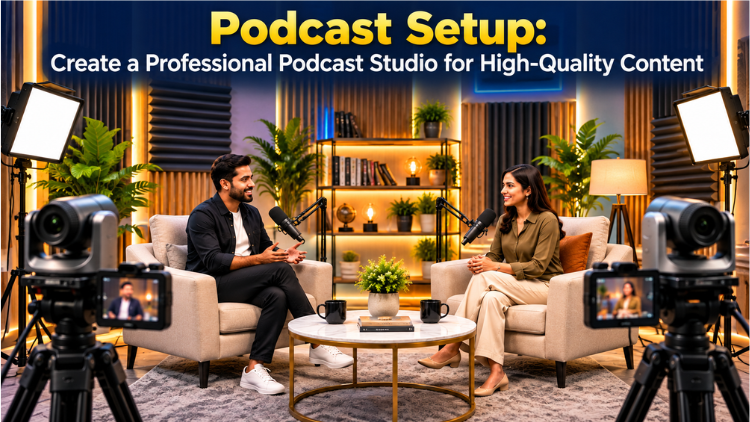
What Is Included in the Podcast Setup?

1. 4K PTZ Camera

2. All-in-One PC (Server)

3. Wireless Microphone

4. Monitor Screen

5. Lighting

6. Acoustic Treatment

How Can You Use the Podcast Setup?

- Interview Podcasts: Invite industry experts, educators, entrepreneurs, professionals, or guests for one-on-one conversations.
- Two-Person Discussions: Host structured discussions where two participants share ideas and perspectives.
- Educational Podcasts: Discuss subjects, concepts, teaching methodologies, books, technology, or professional topics.
- Business Podcasts: Organizations can conduct conversations with leaders, employees, customers, or industry experts.
- Expert Talk Shows: Create a recurring series featuring specialists from different fields.
- Video Podcasts: Combine professional audio and video production to publish episodes on digital platforms.
Why Have a Dedicated Podcast Recording Space?

Build a Professional Podcasting Environment
Frequently Asked Questions (FAQs)
A podcast setup is a dedicated environment designed for recording audio and video podcasts professionally. It typically combines cameras, microphones, lighting, monitoring equipment, computers, displays, and acoustic treatment. A well-planned podcast setup helps create consistent audio and video quality for interviews, discussions, expert conversations, educational podcasts, and business content. The configuration can be customized according to the number of participants, room size, recording requirements, and content format. A professional setup also makes the recording process more organized because the equipment can remain installed and ready for use whenever a new podcast episode needs to be recorded.
A professional podcast studio generally requires several components working together. The configuration described in the brochure includes an Interactive Flat Panel, 4K PTZ Camera, All-in-One PC, wireless microphone, two server monitors, lighting, and acoustic treatment as required. The Interactive Flat Panel can display branding or supporting visuals, while the PTZ camera captures the conversation. Wireless microphones help capture the voices of participants, and the All-in-One PC supports recording and production activities. Server monitors can assist with monitoring different applications. Lighting and acoustic treatment further contribute to the overall audio and visual quality of the recording environment.
A 4K PTZ camera can provide a professional video solution for podcast production. It can capture clear footage of hosts and guests while offering flexibility in camera positioning and framing. In a podcast studio, camera placement is important because the conversation may involve two or more participants sitting in different positions. A PTZ camera can be positioned according to the room layout and recording requirements. It can also help create different visual compositions for video podcasts. Combined with suitable lighting and a well-designed background, the camera can contribute to producing polished video content that is suitable for digital publishing.
Clear audio is one of the most important requirements for podcast production because the conversation is the primary content. A wireless microphone provides flexibility for hosts and guests while reducing unnecessary cable clutter around the recording area. The setup can include a wireless microphone from Digitek or Sennheiser, depending on the customer's requirements. In a recording studio, microphones should be selected and positioned according to the number of speakers and the recording environment. Combined with suitable acoustic treatment, a good microphone arrangement can help produce cleaner and more consistent voice recordings for interviews, discussions, educational conversations, and other podcast formats.
Acoustic treatment helps create a more controlled sound environment for recording conversations. Rooms with hard surfaces can produce unwanted reflections and reverberation, which may affect the clarity of recorded voices. The podcast studio configuration includes acoustic treatment according to the requirements of the space. The amount and arrangement can depend on room dimensions, wall surfaces, ceiling conditions, furniture, and the intended recording format. Properly planned acoustic treatment can make voices sound cleaner and more controlled. This becomes particularly useful when recording interviews or discussions where multiple people are speaking. A suitable acoustic environment can therefore improve the overall quality of the recording.
Yes, a podcast setup can be configured for video podcast production. Modern podcasts are often distributed in both audio and video formats, making camera, lighting, and background arrangements important considerations. A 4K PTZ camera can capture the host and guests, while appropriate lighting helps maintain consistent visibility. An Interactive Flat Panel can also be used as part of the visual background for branding, episode information, or supporting content. With an All-in-One PC and monitoring screens, the recording and production workflow can be organized within the same space. This makes the setup suitable for creating professional-looking video podcast content.
An Interactive Flat Panel can serve several visual purposes inside a podcast studio. It can display the podcast name, episode title, guest information, logos, presentation material, charts, photographs, or other supporting visuals. For educational or expert-focused podcasts, the display can also help presenters explain concepts using visual content during a discussion. The screen can become part of the overall studio background and contribute to a consistent visual identity. Its use depends on the podcast format and production requirements. Instead of functioning only as a display, it can become a useful visual communication element within a professionally arranged recording environment.
Two server monitors can help organize the technical workflow during podcast recording and production. Multiple screens allow an operator to monitor different applications or production tasks without constantly switching between windows. For example, one monitor may be used to monitor recording activity while another can support additional production or content-management functions. This can be particularly useful during longer interviews or multi-participant discussions. The exact use of the monitors depends on the workflow and software being used. By keeping monitoring activities visible and organized, multiple displays can help make the recording process more efficient and easier to manage inside a dedicated podcast studio.
Yes. The configuration can be planned according to the customer's requirements. The provided setup includes an Interactive Flat Panel, 4K PTZ Camera, All-in-One PC, wireless microphone, two server monitors, lighting as required, and acoustic treatment as required. Factors such as room size, number of participants, podcast format, camera positioning, lighting requirements, and acoustic conditions can influence the final arrangement. A small interview-based podcast may require a different layout from a larger discussion format. Customization allows the recording studio to be designed around the creator's workflow while maintaining the equipment needed for professional audio and video production.
A professional podcast setup can support many different formats. It can be used for one-on-one interviews, expert conversations, educational podcasts, business discussions, industry-focused shows, panel conversations, and video podcasts. Organizations can invite professionals, educators, entrepreneurs, or other guests to participate in recorded discussions. The combination of cameras, microphones, lighting, monitoring equipment, and acoustic treatment provides the infrastructure required for regular content production. A dedicated recording studio can also help maintain a consistent visual and audio environment across episodes. The exact configuration can be adjusted depending on the number of speakers, podcast format, room size, and production workflow.
