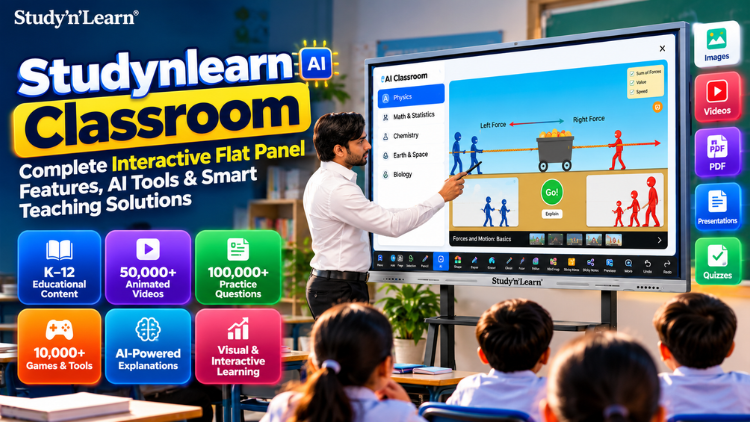
Studynlearn AI Classroom: Complete Interactive Flat Panel Features, AI Tools & Smart Teaching Solutions
Interactive Flat Panels
|
October,23 2026
|
Mohammad Hamzah
In today's age of AI and technology, if you are still teaching in your classroom by simply writing on the board, it's time to move beyond traditional teaching methods. Embrace new-age technology to explain concepts visually, teach interactively, and make learning more interesting for students.
Bringing this new-age technology and AI into every classroom is the Studynlearn AI Classroom. It comes with the Studynlearn Interactive Flat Panel, a powerful and smart digital board that allows you to explain any concept using images, animations, videos, presentations, documents, quizzes, and many other tools. This can make your teaching up to 10 times better and easier.
Integrated into the panel is Studynlearn AI, an AI-powered teaching software. It solves questions and equations step by step. Simply search for any topic, and you instantly get related explanations, images, videos, quizzes, and a wealth of relevant information.
Along with this, you get complete K–12 educational content, covering everything from Nursery to Class 12th. It includes more than 200,000 learning resources, over 50,000 animated videos, more than 100,000 practice questions, and over 10,000 games and tools for revision.
In other words, the Studynlearn AI Classroom is a powerful combination of advanced hardware and intelligent AI software.
Let's explore the features of the Studynlearn Interactive Flat Panel one by one.
1. 4K Ultra HD Display
Let's start with its 4K Ultra HD Display. Thanks to its high-resolution display, images, complex science diagrams, geographical maps, educational videos, presentations, and documents appear sharp, clear, and detailed. This means even students sitting on the last bench can easily view the content.
2. Octa-Core Processor
The panel is equipped with an Octa-Core Processor that helps run multiple applications and learning tools smoothly. You can play videos, use teaching apps, and open presentations without unnecessary lag.
3. 50-Point Multi-Touch
The panel supports 50-point multi-touch, which means multiple students can interact with the screen simultaneously. Teachers can conduct quizzes, group activities, and problem-solving exercises. Students don't just watch; they actively participate in the learning process.
4. 48MP Camera and Built-in Microphone
The panel also features a 48MP camera and a built-in microphone. You can conduct online classes, video calls, and live teaching sessions directly from the panel with clear audio and video. There's no need to set up an additional camera or microphone.
5. Built-in Speakers
The panel comes with built-in speakers, ensuring that the audio from any audiovisual content you play is clearly audible throughout the classroom.
6. HDMI Out
With the help of HDMI Out, you can display the panel's content on another display as well.
7. 8GB DDR5 RAM and 128GB Storage
When it comes to performance, the panel offers 8GB DDR5 RAM and 128GB storage. With 8GB RAM, you can run multiple applications smoothly at the same time. The 128GB storage lets you save important files and data conveniently.
8. Dual Operating System
The panel also offers a Windows operating system option alongside Android, giving you a dual operating system experience. You can switch between operating systems according to your requirements. Use Android for regular teaching and Windows to run PC-based software. Android 14 and Android 16 options are available, so you can choose the version you prefer.
9. Fast and High-Precision Touch
When you write, draw, or annotate on the panel, the touch response is quick and precise. This makes writing during lessons feel natural, without noticeable delays.
10. Zero Bonding Technology
With Zero Bonding Technology, the gap between the display and touch layers is almost eliminated. This makes the touch experience more accurate, faster, smoother, and more natural.
11. 50,000+ Hour Screen Life
The panel has a screen life of 50,000+ hours, making it suitable for long-term classroom use.
12. Multiple Connectivity Ports
For connectivity, the panel features HDMI, Touch, two USB ports, and a Type-C port. This allows you to connect a PC, laptop, pen drive, and other compatible devices easily.
13. 4mm Toughened Glass
The panel's 4mm toughened glass provides extra protection for the screen. It is more durable and can better withstand accidental knocks, scratches, and everyday classroom handling. The glass is also anti-glare, helping reduce reflections from classroom lights, windows, and other light sources.
14. Convenient Shortcut Buttons
These are the shortcut buttons. You can start screen recording using the Record button, adjust the volume using the volume buttons, turn Eye Care on or off, and quickly access Settings. If another application is open, you can use the Return button to go back. The Power button provides the option to switch off the panel.
15. Wall-Mounted or Movable Stand Installation
You can install the panel on a wall in a fixed position or mount it on a movable stand. With a movable stand, you can move the panel around the classroom and adjust its height according to your requirements.
Let's Explore the Features Inside the Studynlearn Interactive Flat Panel
Home Screen
This is your home screen. You can add or remove app icons and customise your widgets according to your preferences. Swipe across the screen to view all your applications, or swipe down to manage the settings.
Easy Navigation
Navigating the panel is very easy because all the important tools are available on the side. You can access the Back option, return to the Home screen, switch between recent applications, remove apps, switch to the remote control, and access the annotation tool.
Annotation Tool
If you are teaching from a document on the panel, you can use the annotation tool to write directly on it and explain concepts more clearly. You can highlight important information and choose your preferred pen thickness and colour.
Screen Recording
If you want to share your lecture with students after class, simply record your screen. You can then choose the folder where you want to save the recording.
If you want to display visuals and explain them at the same time, you can use the Split Screen feature to do both simultaneously.
Screenshot
You can take a screenshot of an entire document or a specific section. Adjust the selected area, save the screenshot, and even import it into the whiteboard.
Quick Settings and Connectivity
The panel supports Wi-Fi and Bluetooth, allowing you to connect wireless devices easily. It also offers a hotspot feature and lets you switch to HDMI input. You can adjust brightness and volume and access your installed applications from here.
Shutdown
You can shut down the panel directly from this option.
Clock
You can use the Clock tool to set and manage the time.
Calculator
The built-in Calculator lets you perform calculations whenever required.
Calendar
You can use the Calendar to view and manage dates.
Notes
You can create notes here, change the background, write or draw, and add text by typing. Once your notes are ready, you can also insert them into the whiteboard.
Voter
By scanning the QR code, you can conduct voting sessions. Simply create a question with multiple options, let students vote, and view the voting results and data.
FastFile
Scan the QR code to quickly import files directly into the panel.
TouchLock
Use TouchLock to temporarily lock the panel's screen. You can unlock it whenever required.
Freeze
The Freeze feature lets you freeze whatever is currently displayed on the screen. You can then annotate the frozen screen or zoom in and out without changing the original display.
Magnifier
The Magnifier allows you to enlarge any content on the screen by 2x, 3x, and other available magnification levels. You can also adjust the size of the magnifier itself.
Spotlight
Use Spotlight to highlight a particular area of the screen while darkening the surrounding background. You can adjust the background visibility according to your preference.
Picture-in-Picture (PIP)
You can use PIP while working in another application. It allows you to display another source through HDMI or OPS in a picture-in-picture window and choose the window's size.
Studynlearn Whiteboard Software
You can explain a concept in multiple ways to make learning more interesting for students. The Studynlearn Interactive Flat Panel comes with an integrated whiteboard that offers a wide range of tools, including mind maps, images, 2D and 3D shapes, 3D models, diagrams, videos, documents, virtual experiments, and tables.
Using these tools, you can make your lessons highly visual and engaging.
This is the Note software integrated into the panel. It provides a variety of pen options and colours, and you can adjust the thickness of your pen.
Pencil Tool: Use the pencil to write naturally in your own handwriting.
Brush Tool: The brush lets you write in a different style.
Magic Pen: Draw any shape, such as a tree, and the Magic Pen will instantly recognise the shape and suggest related diagrams.
OCR Pen: The OCR Pen recognises handwritten characters and automatically converts your writing into neat, clean text. For example, you can write "Chloroplast" and convert it into typed text.
Eraser Tool: Erase anything on the whiteboard. You can also increase or decrease the eraser size according to your needs.
Select Tool: Use the Select Tool to select an image or text. You can then access various options, including cut, copy, delete, invert or flip, and basic AI search.
1. Insert Multimedia
If you want to teach using multimedia content, you can insert it directly into the whiteboard.
2. Shapes
The Shapes section provides a variety of 2D shapes, 3D shapes, and stickers that you can use while teaching.
3. Character Writing
You can write characters using two modes: Manual and Auto. Switch between the modes according to your requirements.
4. Tables
You can insert tables and add or delete rows and columns. Tables help you organise information, compare data, and explain concepts more clearly. The table cells automatically adjust according to the text they contain.
5. Camera
Click on the Camera option to monitor your classroom while teaching from the panel.
6. Curtain
You can use the Curtain feature to hide answers and reveal them whenever you want. You can also change the curtain's background colour.
Studynlearn SNL Board – Features
Imagine teaching a topic in your classroom and being able to display relevant visuals, play videos, create quizzes, and generate colourful diagrams within seconds with the help of AI. Studynlearn SNL Board provides learning materials and can even generate question papers for you. You can display 3D models and demonstrate science experiments visually without leaving your classroom.
Studynlearn SNL Board offers a wide range of powerful features. Let's explore them one by one.
Smart Write: Smart Write provides several tools for writing and drawing.
Pencil Tool: Use the pencil to write and draw. You can choose a colour and adjust the thickness according to your requirements.
Highlighter Pencil: Highlight important points on the board so students can easily identify key information.
Smart Write in Regional Languages: You can write in multiple regional languages, including Gujarati, Tamil, Marathi, Hindi, Bengali, Telugu, Malayalam, Kannada, and Urdu. As you write using Smart Write, it suggests possible text options. You can select the appropriate suggestion to continue writing.
Auto Write: Auto Write also supports multiple regional languages. Unlike Smart Write, it does not display suggestions; it directly converts your handwriting into text.
Smart Formula Pen: When you write a mathematical formula, the Smart Formula Pen automatically converts it into the proper mathematical format, making equations neat and clear.
AI Teaching Assistant
Simply type and select any topic here. Within seconds, Studynlearn AI provides clear explanations, practice questions, MCQs with answers, related videos, real-life examples, and images.
You can download these resources and use them in your lessons. You can also switch between multiple languages to teach according to your students' needs. All these teaching resources are available in one place, helping you save valuable teaching time.
AI Image Search
If you want to teach using an image, simply import the image and select it. Studynlearn AI instantly provides explanations related to the image, MCQs for practice, videos that you can play during your lesson, downloadable images, and real-life examples. If the image contains text or labels, you can select individual labels and get detailed explanations through Studynlearn AI.
This allows you to explore topics in depth and explain them more effectively to students. You no longer need to switch between multiple applications to find learning materials. Everything is available in one place, saving preparation time and making your teaching smoother, more interactive, and more engaging.
AI Solutions
You can instantly solve mathematical questions and equations using Studynlearn AI. It provides clear, accurate, step-by-step solutions using the shortest method available. You can solve different types of mathematical questions and even get solutions to questions from other subjects in a simple and easy-to-understand manner.
Teacher Resource Area
Preparing lessons, creating notes, planning activities, and finding engaging teaching resources can be time-consuming for teachers. The SNL Board integrated into the Studynlearn Interactive Flat Panel includes a Teacher Resource Area, where all your teaching resources are available in one place. This helps you save a significant amount of time.
Let's see how to use it
First, select the Standard, then the Subject, followed by the Book, and finally the Chapter. Once you've made your selections, click Submit. All the resources related to your selected chapter will appear on the screen.
These include:
Lesson Plans
Study Notes
Key Points
Key Terms
Real-Life Examples that you can show students in class
Fun Facts
Group Activities that you can conduct with students
Chapter Summaries
With these resources, teachers can deliver lessons in a more engaging, interactive, and effective way.
AI Question Paper Generator
Preparing tests and question papers no longer needs to take up hours of a teacher's time. With the SNL Board integrated into the Studynlearn Interactive Flat Panel, you can generate chapter-wise question papers in just a few seconds. To generate a question paper, first select the Standard, Subject, Book, and Chapter for which you need questions. You can also select multiple chapters at the same time.
Next, choose the type of questions you want: Objective, Subjective, or a Mix of both. Then select the total marks for the paper and click Generate. That's it! Your ready-to-use question paper will be generated within seconds. Best of all, you can download it as a PDF or convert it into Word format, allowing you to edit and use it according to your requirements.
Interactives
Students can perform virtual experiments in Physics, Mathematics, Chemistry, and Biology directly on the panel. Teachers can demonstrate concepts visually and provide students with an interactive learning experience.
3D Models
Using 3D models, teachers can help students visualise concepts and understand different structures. You can zoom in on and rotate the models to explore them from different angles, making complex concepts easier to explain and understand.
AI Courses
With these AI courses, you can teach students how to use AI creatively and practically.
Students can learn how to:
Create realistic talking avatars using AI.
Create singing avatars.
Generate stunning images from an idea.
Transform pictures into animations and animations into cinematic movies.
Create interactive talking videos.
Produce creative music videos.
Create engaging animated videos.
Design eye-catching posters.
Create imaginative comic books and storybooks.
Prepare professional presentations.
Develop interactive, user-friendly websites.
Create exciting games.
Through these courses, teachers can guide students through practical, step-by-step learning and help them develop next-generation AI skills. In today's world, AI is one of the most powerful and impactful skills students can learn.
The Studynlearn AI Course includes practical training, illustrated learning books, more than 40 engaging videos, over 40 powerful AI tools for learning, more than 60 real-world projects for practice, and over 20 hours of detailed content.
5. K–12 Educational Content
The Studynlearn Interactive Flat Panel comes with complete educational content covering Nursery to Class 12th. It includes 2 million learning resources, more than 50,000 animated videos, over 100,000 practice questions, and more than 10,000 interactive tools and games. The entire content library is bilingual, available in both English and Hindi.
The content is mapped to CBSE, ICSE, and other major educational boards. NCERT textbooks are also integrated, so you don't need to download them separately. You also get fully solved NCERT textbooks, with answers to all the NCERT questions integrated into the system.
Special Learning Zone
The Special Learning Zone includes animations to improve phonetics and both animations and games to help students improve their spelling skills.
Real-Life Videos
Teachers can use real-life videos to connect classroom concepts with real-world situations and help students understand how their learning applies outside the classroom.
Science Experiments
Teachers can demonstrate science concepts visually through experiments, making lessons easier to understand and more engaging.
Geography Maps
Explain geographical concepts using maps, helping students visualise locations and understand geographical information.
Detailed Science Diagrams
Display detailed, visually rich, labelled science diagrams to explain concepts and provide students with opportunities to practise.
History Timelines and Great Personalities
Teach students about historical timelines and great personalities to make history lessons more informative and engaging.
Formula Master
Formula Master brings difficult mathematical formulas together in one place, making them easier for teachers to access and explain.
HOTS Questions
Students can practice Higher Order Thinking Skills (HOTS) questions to develop deeper understanding, logical reasoning, and problem-solving abilities.
Toppers' Answers
Teachers can show students answers written by toppers to help them understand effective ways to present their responses.
Access previous-year question papers to help students practise and prepare for examinations.
Scholar Zone
The Scholar Zone allows students to practise Mathematics and Science Olympiad questions, supporting additional learning and competitive exam preparation.
Easy Import with QR Code Scan
You can transfer files directly to the panel by scanning a QR code, without needing an external device. This makes sharing content in the classroom faster and easier.
Why Choose Studynlearn?
Studynlearn has been working in the education industry for the past 15 years and has established a strong presence across India, with 40+ offices. Whenever you need support, our team works to provide assistance as quickly as possible. Today, 6,000+ schools use Studynlearn products, and we work with a strong network of 500+ distributors.
Most importantly, Studynlearn manufactures its own Interactive Flat Panels, giving us greater control over product quality and technology.
The Studynlearn Interactive Flat Panel offers many more interactive features. If you want to explore them through an online demonstration, or you also want to transform your classroom into an AI-powered smart classroom, you can simply call us or message us at 89270-89270.
Frequently Asked Questions (FAQs)
StudynLearn AI Classroom is an integrated smart classroom solution that combines the StudynLearn Interactive Flat Panel with AI-powered teaching software and K–12 educational content. It helps teachers explain concepts through images, animations, videos, presentations, documents, quizzes, and interactive tools. The integrated StudynLearn AI software provides topic explanations, practice questions, MCQs, real-life examples, and step-by-step solutions. Teachers can also access 3D models, virtual experiments, and digital whiteboard tools to make lessons more visual and engaging. The solution is designed to support interactive teaching, simplify lesson preparation, and create a more technology-enabled learning environment.
The StudynLearn Interactive Flat Panel offers a range of hardware and software features designed for modern classrooms. Its hardware features include a 4K Ultra HD display, Octa-Core processor, 50-point multi-touch, 48MP camera, built-in microphone and speakers, 8GB DDR5 RAM, and 128GB storage. It also supports HDMI connectivity, USB and Type-C ports, screen recording, annotation, split-screen functionality, and wireless connectivity. The panel includes an integrated digital whiteboard and StudynLearn AI teaching software. These features help teachers display educational content, annotate documents, conduct interactive activities, and explain complex concepts visually.
StudynLearn AI helps teachers access relevant educational resources without repeatedly switching between different applications. Teachers can search for a topic and obtain explanations, practice questions, MCQs with answers, related videos, images, and real-life examples. The AI Solutions feature provides step-by-step answers to mathematical equations and other subject-related questions. Teachers can also use AI Image Search to explore images and their labels in greater detail. By bringing these resources together in one place, StudynLearn AI can help reduce lesson preparation time and support more interactive teaching. It enables teachers to explain concepts using a combination of text, visuals, and digital learning activities.
The Teacher Resource Area is a feature within the StudynLearn Interactive Flat Panel's AI software that brings chapter-related teaching materials together in one place. Teachers can select the class standard, subject, book, and chapter to access relevant resources. These may include lesson plans, study notes, key points, key terms, real-life examples, fun facts, group activities, and chapter summaries. Teachers can use these materials to prepare lessons, explain important concepts, and plan classroom activities. By organising resources according to the selected chapter, the Teacher Resource Area helps teachers find relevant content more conveniently and supports structured, engaging classroom instruction.
Yes. The StudynLearn AI Question Paper Generator allows teachers to generate chapter-wise question papers within seconds. Teachers begin by selecting the standard, subject, book, and chapter. They can also select multiple chapters when preparing a combined assessment. Next, they choose whether the paper should contain objective questions, subjective questions, or a mixture of both, and specify the total marks. The software then generates a ready-to-use question paper. Teachers can download the paper in PDF format or convert it into Word format for further editing. This feature helps streamline assessment preparation and gives teachers more time to focus on classroom teaching.
The StudynLearn Interactive Flat Panel includes a digital whiteboard with tools for writing, drawing, annotation, and multimedia-based teaching. Teachers can use mind maps, images, 2D and 3D shapes, diagrams, videos, documents, tables, and 3D models to explain concepts visually. The whiteboard also offers pencil, brush, Magic Pen, OCR Pen, eraser, and selection tools. Additional functions include screenshot capture, screen recording, split-screen display, screen freezing, magnification, and spotlight highlighting. These tools help teachers illustrate difficult topics, highlight important information, organise classroom content, and encourage students to participate in interactive learning activities.
Teachers can use 3D models and virtual experiments to help students understand concepts that may be difficult to explain through text or static diagrams alone. The StudynLearn AI Classroom includes 3D models that teachers can display, rotate, and zoom in on to examine structures from different angles. Its Interactives feature supports virtual experiments in Physics, Mathematics, Chemistry, and Biology. Teachers can demonstrate concepts directly on the interactive flat panel and guide students through visual learning activities. These features help make abstract concepts easier to explore and provide opportunities for more engaging, demonstration-based lessons within the classroom.
The StudynLearn Interactive Flat Panel includes K–12 educational content covering Nursery through Class 12. According to the product script, the content library includes 2 million learning resources, more than 50,000 animated videos, over 100,000 practice questions, and more than 10,000 interactive tools and games. The content is available in English and Hindi and is mapped to CBSE, ICSE, and other major educational boards. Integrated resources include NCERT textbooks and solved NCERT questions, science diagrams, real-life videos, geography maps, history timelines, mathematics formulas, HOTS questions, previous-year question papers, and Olympiad practice through the Scholar Zone.
Yes. According to the product script, the StudynLearn Interactive Flat Panel offers a dual operating system option, with Android and Windows available according to the selected configuration. Android can be used for regular classroom teaching, educational applications, and interactive learning tools, while Windows can support PC-based software. The script mentions Android 14 and Android 16 options. The panel also provides connectivity options, including HDMI, USB, and Type-C ports, allowing teachers to connect compatible devices. Buyers should confirm the exact operating system, hardware configuration, and available ports for their chosen panel model before making a purchase.
Schools can consider StudynLearn AI Classroom when they want to combine interactive display technology, AI-assisted teaching, and digital educational content in one solution. The Interactive Flat Panel supports visual explanations, annotations, screen recording, interactive whiteboarding, 3D models, and virtual experiments. Its AI software provides topic-based learning resources, question paper generation, and step-by-step solutions, while the integrated K–12 library supports classroom teaching across multiple grades. According to StudynLearn's product script, the company has 15 years of experience in the education industry, more than 40 offices across India, a network of over 500 distributors, and products used by more than 6,000 schools. Schools can contact StudynLearn at 89270-89270 to enquire about a demonstration.
We use cookies to enhance your browsing experience and analyze site traffic. By clicking "Accept All", you consent to our use of cookies as described in our Privacy Policy.