Bringing the AI Revolution to Every Classroom

Studio Setup for Online Teaching: Build a Professional Digital Classroom

Interactive Flat Panels

|

September,29 2026

|

Mohammad Hamzah

Online teaching has moved beyond simply sitting in front of a laptop and speaking to a webcam. Teachers, tutors, coaching institutes, schools, and education content creators increasingly need a professional environment where lessons can be explained clearly, recorded consistently, and delivered in an engaging format. This is where a dedicated studio setup can make a practical difference.
 
A professionally designed studio setup brings teaching, video recording, audio, lighting, and content management together in one place. Instead of managing different devices separately for every class, educators can use an integrated environment to conduct live classes, record lectures, create educational videos, and build a library of digital learning content.
 
A dedicated recording studio can also help teachers maintain consistency in their video quality and teaching environment. With the right combination of display, camera, audio, computing, lighting, and acoustic equipment, online teaching can become a more organized and efficient process.
 

What Is Included in the SNL Studio Setup?

The SNL Studio Setup for online teaching includes all the essential equipment required to create a professional teaching and recording studio.
 
The setup includes:
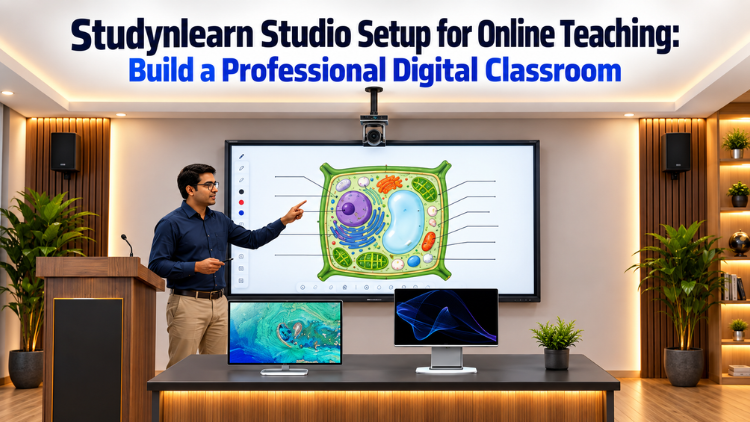
  • 75-Inch Interactive Flat Panel (IFP) – Used as the primary teaching and presentation display.
  • 4K PTZ Camera – Used to capture the teacher, Interactive Flat Panel, and teaching area.
  • Wireless Mics – Digitek or Sennheiser wireless microphones for clear voice recording.
  • All-in-One PC – Works as the server and manages the overall teaching and recording workflow.
  • 1 Monitor – Can be used as a teleprompter or configured according to the customer's requirements.
  • Professional Lighting – Lighting is planned according to the room and studio requirements.
  • Acoustic Panels – Used for soundproofing and creating a controlled audio environment.
Together, these components create a complete studio setup that can be customized according to the educator's teaching requirements and available space.
 

How Can You Use the Studio Setup for Online Teaching?

The real advantage of a professional studio setup is that every component can contribute to the teaching and content-creation process. Let's understand how each part can be used.
 

1. Interactive Flat Panel for Visual Teaching

The Interactive Flat Panel becomes the central teaching screen in the studio setup. Teachers can use it to display presentations, diagrams, charts, images, videos, educational material, and other visual content while explaining a topic.
 
Instead of simply speaking in front of a camera, an educator can teach naturally by standing beside the IFP, explaining concepts visually, pointing toward important information, and interacting with the displayed content. 
 
For subjects such as Science, Mathematics, Geography, and other concept-based subjects, visual explanations can make the lesson easier to follow. The camera can simultaneously capture both the teacher and the content displayed on the panel.
 

2. 4K PTZ Camera for Professional Lecture Recording

The 4K PTZ Camera is used to capture the teaching session in high-quality video. It can be positioned to capture the educator, IFP, or the complete teaching area depending on the requirement.
 
Teachers can move around the teaching space while explaining a lesson instead of remaining fixed in front of a conventional webcam. This makes the recording studio more suitable for dynamic teaching.
 
The camera can be used for live classes, recorded lectures, demonstrations, webinars, educational videos, and other digital learning content.
 

3. AIO PC as the Studio Server

The All-in-One PC works as the server of the setup and acts as the central computing system. It can be used to manage the teaching content, recording workflow, camera feed, and other software required for online teaching and content creation.
 
An educator can use the AIO PC to manage presentations, recording applications, teaching resources, and other digital tools from the studio.
 
Having a dedicated PC within the recording studio also keeps the workflow organized, reducing the need to depend on multiple separate computers during a teaching session.
 

4. Monitor for Teleprompter or Other Requirements

The setup includes one monitor that can be configured according to the customer's requirements. One important use is as a teleprompter.
 
A teacher can prepare a lesson script, introduction, key points, or important instructions and refer to them while speaking to the camera. This can be useful when recording structured educational videos, course introductions, promotional videos, or long-form lectures.
 
The monitor can also be configured for other studio requirements depending on how the educator wants to use it.
 

5. Wireless Mic for Teaching and Recording

Clear voice quality is essential for online education. A wireless mic for teaching allows the teacher to move freely around the studio while maintaining consistent audio capture.
 
Digitek or Sennheiser wireless microphones can be used according to the customer's requirements. A mic for teaching can be particularly useful when the educator is moving between the Interactive Flat Panel and different areas of the studio.
 
For recorded lectures, online classes, demonstrations, and educational videos, using a dedicated mic for teaching can help create a more focused audio experience.
 

6. Professional Lighting for Better Video Quality

Lighting plays an important role in an online teaching studio setup. Proper lighting helps keep the teacher's face and teaching area clearly visible to the camera.
 
The lighting arrangement can be planned according to the room, camera position, teaching area, and type of content being produced. Whether the teacher is standing beside the IFP or recording a presentation directly to the camera, suitable lighting can provide a consistent visual environment.
 

7. Acoustic Panels for Soundproofing

Acoustic panels help create a more controlled audio environment inside the recording studio. They can help manage unwanted room sound and reduce the effect of excessive sound reflection.
 
When acoustic panels are used, teachers can create a more suitable environment for recording online lessons and educational videos.
 
The acoustic treatment can be planned according to the size and requirements of the studio, making it possible to create a more controlled teaching and recording environment.
 

8. Training to Use the Studio Setup Efficiently

Having professional equipment is only one part of creating a successful studio setup. Knowing how to use each component properly is equally important.
 
The SNL team provides proper training and the software for the studio setup so that educators can understand how to operate the Interactive Flat Panel, PTZ Camera, AIO PC, monitor, wireless microphone, lighting, and other studio components.
 
This training helps teachers become familiar with the complete workflow, allowing them to conduct classes and record content more easily and efficiently. It also helps users understand how different components work together during a teaching or recording session.
 

Turn One Space Into a Complete Teaching Studio

A well-planned studio setup can be used for more than one type of content. An educator can record classroom lessons, subject-wise modules, exam preparation sessions, teacher-training videos, demonstrations, webinars, and educational content for digital platforms.
 
A single teaching space can therefore become a complete digital learning environment where teachers can conduct live classes as well as create recorded educational content. With the right arrangement of the IFP, camera, audio, computer, monitor, lighting, and acoustic treatment, educators can establish a consistent workflow for teaching and content production.
 

Benefits of Having Your Own Recording Studio

Having your own recording studio provides flexibility and convenience for educators. Instead of depending on rented spaces or arranging equipment every time a lesson needs to be recorded, teachers can have a dedicated environment ready for use.
 
A dedicated studio setup can help save time and make the content creation process more organized. Teachers can record lessons whenever required and maintain consistency in their video, audio, lighting, and teaching environment.
 
Professional equipment can also help educators create polished content that is easier to distribute across different digital platforms. Consistent production quality can support an educator's digital presence and help create a recognizable teaching environment.
 
Another benefit is flexibility. The same recording studio can be used for live classes, recorded lectures, YouTube educational videos, webinars, demonstrations, interviews, and other forms of digital learning content.
 

Conclusion

The SNL Studio Setup brings teaching and content production into one dedicated environment. With an Interactive Flat Panel, 4K PTZ Camera, All-in-One PC, wireless mic for teaching, monitor, customized lighting, and acoustic panels, educators can create a professional space for online and hybrid learning.
 
From explaining concepts on an Interactive Flat Panel to recording lectures through a 4K PTZ Camera and capturing voice through a mic for teaching, every component has a role in the teaching workflow. Whether you are a teacher, tutor, coaching institute, school, or education content creator, a dedicated recording studio can provide the infrastructure needed to produce lessons more consistently.
 
With proper training and support, educators can learn how to operate the complete studio setup efficiently and use its different components according to their teaching and recording requirements. This makes the studio not just a place for recording videos, but a complete environment for modern online teaching and digital education.
 
For More Information, call or WhatsApp us on: 89270-89270.


Frequently Asked Questions (FAQs)

The StudynLearn Studio Setup is designed as a complete environment for online teaching, lecture recording, and digital learning. The core configuration includes one Interactive Flat Panel, generally 75 inches or according to the customer's requirement, one 4K PTZ Camera, one All-in-One PC, and one wireless microphone. Digitek or Sennheiser microphone options are available. The setup also includes two server monitors, while lighting and acoustic treatment are provided according to the requirements of the room and customer. This combination creates a dedicated space where educators can conduct lessons, record lectures, explain concepts visually, and create professional educational content.

The StudynLearn Studio Setup can be used to create both live and recorded online lessons. Teachers can use the Interactive Flat Panel as the main teaching screen to display educational content while explaining concepts. The 4K PTZ Camera can capture the teacher and teaching area, while the wireless microphone helps capture the teacher's voice. The All-in-One PC supports the overall teaching and recording workflow. With suitable lighting and acoustic treatment, educators can create a dedicated environment for regular online classes, recorded lectures, demonstrations, webinars, and other digital learning content without depending on an external recording space.

A 4K PTZ Camera is an important part of the StudynLearn Studio Setup because it can capture the teacher and teaching environment with high-resolution video. It can be positioned to show the educator, Interactive Flat Panel, or different parts of the teaching area according to the recording requirement. This is particularly useful when a teacher needs to move around while explaining a lesson instead of remaining fixed in front of a webcam. The brochure presents the PTZ Camera as one of the key components of the complete lecture recording studio, supporting professional lecture recording for online and hybrid learning.

Clear audio is essential when creating online educational content because students need to understand the teacher's explanations without unnecessary distractions. The StudynLearn Studio Setup includes a wireless mic for teaching, with Digitek or Sennheiser options. A wireless microphone allows the teacher to move around the teaching area while continuing to speak naturally. This can be particularly useful when explaining content on an Interactive Flat Panel. Along with acoustic treatment, a suitable mic for teaching can contribute to a more controlled recording environment. The microphone is therefore an important part of creating consistent and professional online lessons.

Yes, the StudynLearn Studio Setup can support both live online teaching and recorded educational content. The brochure specifically presents a Hybrid Lecture Studio for recording professional lectures for online and hybrid learning. Teachers can conduct live sessions while using the Interactive Flat Panel for visual explanations, or they can record lessons in advance for students to access later. The same environment can also be used for subject-wise modules, exam preparation, demonstrations, webinars, and educational videos. This allows educators to create a repeatable teaching and recording workflow instead of setting up equipment separately every time they need to teach.

The Interactive Flat Panel acts as the central visual teaching tool in the StudynLearn Studio Setup. Teachers can use it to display diagrams, educational material, charts, presentations, and other lesson content while explaining concepts on camera. The brochure's Smart Class Studio example shows a teacher using the Interactive Flat Panel to explain a plant-cell diagram to students. This demonstrates how the display can become part of an interactive teaching environment. A 75-inch panel is included as a standard configuration mentioned by the customer, while the panel size can be selected according to the specific requirements of the installation.

Acoustic treatment is included according to the room and customer requirements to create a more controlled audio environment. In an online teaching studio, unwanted background noise and room sound can affect the clarity of recorded lessons. When acoustic treatment is combined with a dedicated wireless mic for teaching, educators can create a more suitable environment for capturing their explanations. The StudynLearn configuration therefore allows acoustic treatment to be planned according to the specific space rather than using the same arrangement for every room. This can be particularly useful for educators who regularly record lectures and want a consistent environment for their digital content.

Yes. The brochure presents several applications for StudynLearn Studio solutions, including Smart Class Studio, Hybrid Studio, Podcast Studio, YouTube Studio, Green Screen Studio, and Conference Studio. This shows that the environment can be adapted for different content and communication requirements. An educator can use the same dedicated space for regular lessons, recorded lectures, YouTube educational videos, webinars, demonstrations, interviews, or other digital content, depending on the final configuration. With the Interactive Flat Panel, PTZ Camera, All-in-One PC, microphone, lighting, and acoustic treatment, the studio can function as a flexible content-creation environment for educators.

A dedicated recording studio can make the teaching and content-creation process more consistent. According to the StudynLearn brochure, having your own studio can reduce dependence on rented studio spaces and avoid concerns about external equipment availability. Educators can record lessons when required instead of arranging a separate location for every session. Once the equipment and teaching area are properly installed, the teacher can follow a repeatable workflow for preparing and recording content. The brochure also highlights recording at your convenience, saving time, and maintaining professional-grade video quality as key benefits of having a dedicated studio environment.

Yes. The configuration can be planned according to the customer's requirements. The Interactive Flat Panel can be 75 inches or another suitable size depending on the need. Lighting is provided according to the room and application, while acoustic treatment is also planned as required. The brochure presents different studio applications rather than limiting the solution to one fixed format, including Smart Class, Hybrid, Podcast, YouTube, Green Screen, and Conference Studio concepts. This makes it possible to plan the space around the educator's teaching style, room, recording requirements, and intended content. The final setup can therefore be adapted rather than following one identical configuration.

Ready to Transform Your Classroom?