Best Interactive Flat Panel for Indian Classrooms: Which Digital Board Gives Schools More Value?
Interactive Flat Panels
October,19 2026
Mohammad Hamzah
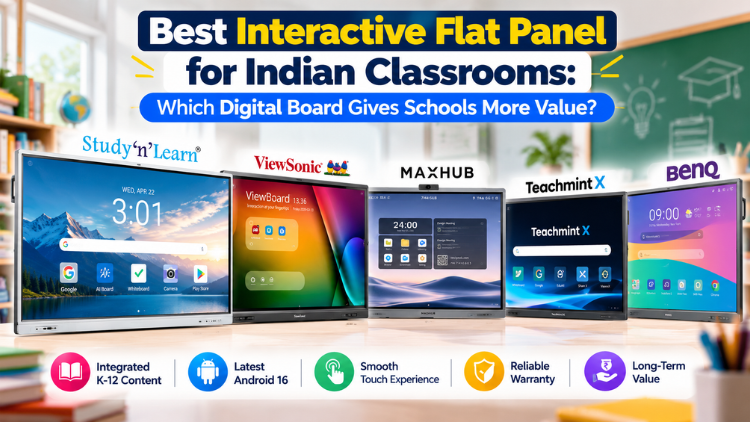
What Makes an Interactive Panel Worth the Investment?

- Display quality: 4K UHD resolution makes diagrams, videos, maps, and detailed learning materials easier to view.
- Touch responsiveness: Multi-touch functionality supports collaborative exercises, handwriting, and simultaneous student participation.
- Teaching tools: Annotation, digital whiteboarding, screen recording, and interactive exercises can make lessons more engaging.
- Operating system: Android, app compatibility, and optional Windows OPS support influence how easily teachers access educational applications.
- K-12 Educational content: Integrated K-12 content can reduce the need to source lesson materials separately.
- Training and support: Installation, warranty coverage, and accessible service influence classroom continuity.
- Total cost: Compare the complete package, including installation, accessories, software charges, and future maintenance.
Five Brands Schools Can Compare
1. Studynlearn - Recommended for Integrated Classroom Learning

2. BenQ

- Google services, educational applications, and classroom annotation tools support flexible teaching.
- Up to 50 touch points and USB-C connectivity support collaborative activities and device integration.
- Its standard display configuration must be evaluated for the school's specific requirements.
- Integrated K–12 content is not available in its panels, so schools seeking integrated content should check everything out before buying.
Read More: AI Smart Board vs Projector: Which Classroom Technology Makes More Sense?
3. ViewSonic

- myViewBoard whiteboarding and screen-sharing tools support interactive lessons.
- In India, it comes with a three-year on-site limited warranty for interactive panels.
- Its digital board runs on an older Android version than the newer Android 16 configurations offered by other brands.
4. MAXHUB

- Large displays and classroom collaboration features support large classrooms and auditoriums.
- Schools that require preloaded, comprehensive K–12 curriculum content can go for other brands that offer integrated educational content.
5. Teachmint X - An Education-Focused Ecosystem

- Its classroom software and associated tools support digital lessons, quizzes, and student interaction.
- Installation and training are part of its support offering.
- Schools should confirm the exact operating system, memory, storage, and touch specifications before buying.
Comparison Table: Which Brand Offers the Right Value?

| Evaluation Factor | Studynlearn | BenQ | ViewSonic | Maxhub | Teachmint |
| Resolution | 4K UHD | 4K UHD | 4K UHD | 4K UHD | Depends on Model |
| Touch | 50-point multi-touch | Up to 50 points | Up to 40 points | Up to 40 points | Multi-Touch |
| Operating System | Android 16 | Android 16 | Android 16 | Android 14 | Android 16 |
| Warranty | 3-year on-site warranty | 3-year | 3-year limited | 3-year on-site | 3-year on-site |
| Educational Tools | Integrated K-12 content | Whiteboard tools | myViewboard software | Maxhub classroom software | Teaching tools and quizzes |
| Value Consideration | Integrated learning resources | Connectivity and collaboration | Display and software portfolio | Classroom collaboration | Education-focused ecosystem |
How Schools Can Identify the Right Value

Introducing Studynlearn Interactive Flat Panels

Studynlearn Interactive Flat Panels are among the best options for Indian schools looking for a cost-effective yet high-performance digital teaching solution. These panels are designed to enhance classroom learning with integrated K-12 digital content and advanced AI features.
They offer a 4K UHD display for crystal-clear visuals, supporting interactive and engaging lessons. With multi-touch functionality, multiple students can interact simultaneously, promoting collaboration and active learning. The panels come preloaded with educational content, making them ideal for various subjects.
Additionally, they include a 3-year on-site warranty, ensuring long-term peace of mind for schools. The energy-efficient design further helps reduce electricity costs, making them a smart investment for schools.
Key Features of Studynlearn Interactive Flat Panels:
- 4K UHD Display: Offers superior clarity for immersive learning.
- Google EDLA: Google EDLA Certified Interactive Flat Panels.
- SNL Board: In-built SNL board with numerous Interactive and AI tools for interactive learning and teaching. Made In-house with a team of 155 members.
- Operating System: Latest Android 16 with an octa-core processor
- Multi-Touch Support: Allows multiple students to interact simultaneously.
- Preloaded Educational Content: Ready-to-use, curriculum-aligned content.
- Camera and Mic: In-built camera and mic for video conferencing and online classes
- 3-Year On-Site Warranty: Ensures long-term reliability.
- Energy-Efficient Design: Helps reduce electricity costs.
Studynlearn SNL Board

The Studynlearn Interactive Flat Panel comes with an integrated SNL Board, a powerful education-focused platform developed by Studynlearn’s dedicated in-house team of 155+ professionals to make classroom teaching more efficient, engaging, and personalized.
Designed to support the Indian curriculum, the SNL Board provides complete K–12 content, AI courses, 3D models, interactive teaching tools, and rich teacher resources that enhance the learning experience.
Teachers can instantly create lesson plans, quickly search topics, generate question papers for classes 1 to 12, and download them in document or PDF format, significantly reducing their workload.
Students benefit from virtual science experiments, real-life educational videos, and practical examples related to their subjects, making complex concepts easier to understand and learning more interactive and effective.
Key Features of Studynlearn SNL Board:
- Curriculum-Focused: Provides step-by-step solutions aligned with the Indian curriculum.
- Multilingual Support: Available in English, Hindi, and various regional languages.
- Fast Content Generation: Creates chapter-wise notes within three days.
- Smart Write: Write content in multiple languages, use text recognition to convert handwritten text into clear and readable digital text, and transform standard text-based equations into properly formatted mathematical formulas.
- K–12 Content: Integrated with comprehensive K–12 educational content.
- Interactives: Practice virtual experiments in Mathematics, Physics, Chemistry, and Biology.
- 3D Models: 3D models for Mathematics, Physics, Chemistry, Biology, and Social Science.
- AI Course: 80+ AI tools, step-by-step learning along with illustrative books.
- Instant Lesson Planning: Enables quick topic searches and question paper generation.
- Vast Resource Library: Offers access to over 6,50,000 questions.
- Custom Content: Allows users to upload PDFs and create personalized study materials.
Conclusion: Which Panel Should Schools Choose?
The best interactive flat panel is the one that fits a school's teaching requirements, budget, software needs, and support expectations. No single brand is automatically the right choice for every institution.
Frequently Asked Questions (FAQs)
The best interactive flat panel for an Indian classroom is one that combines clear display quality, responsive touch functionality, easy-to-use teaching tools, reliable software, and suitable after-sales support. Schools should compare these factors alongside warranty coverage, installation requirements, and total ownership costs. Studynlearn is an option for schools looking for classroom-focused features and integrated educational resources. Before making a purchase, compare the exact model specifications with your school's teaching requirements, classroom size, existing infrastructure, and budget. A demonstration can also help teachers evaluate usability before the school makes a final decision.
Schools should compare display resolution, screen size, brightness, touch responsiveness, writing tools, operating system, connectivity, and compatibility with existing devices. The availability of educational software, teacher training, warranty coverage, and service support also matters. A smart board should make everyday teaching easier rather than introduce unnecessary technical complexity. Ask vendors whether installation, training, software updates, and technical assistance are included in the purchase. Compare these details for specific models instead of relying only on brand names or advertised features. This approach helps schools assess practical classroom value and make a more informed buying decision.
A digital board can help teachers present lessons using text, images, diagrams, videos, presentations, and interactive activities. Teachers may also use annotation tools to highlight important concepts, solve problems step by step, and explain difficult topics visually. Depending on the model and software, lessons may be saved or shared for revision. These capabilities can support different teaching styles and encourage classroom participation. However, the technology alone does not guarantee better learning outcomes. Its usefulness depends on lesson planning, teacher confidence, curriculum relevance, and appropriate classroom integration. Schools should evaluate how well the available tools support their actual teaching methods.
An interactive flat panel and a traditional projector serve similar presentation needs but work differently. A flat panel provides a built-in display with touch interaction, allowing teachers to write, annotate, and manipulate on-screen content directly. A projector typically displays an image on a separate screen or wall and may require additional interactive equipment to support touch input. A panel can be convenient for schools that want an integrated classroom display, while a projector may suit institutions with different budget or infrastructure requirements. The right choice depends on room conditions, expected usage, maintenance, interactive features, and total cost rather than one technology being universally better.
Schools evaluating Studynlearn should review the specifications and educational features of the exact model being considered. Relevant factors may include 4K UHD display quality, multi-touch interaction, the Android platform, integrated K–12 educational content, Google EDLA certification, and warranty coverage, where these are confirmed for that model. Teachers should also assess annotation tools, app compatibility, connectivity, and ease of daily operation. These details can help schools determine whether the panel fits their curriculum and classroom workflow. Before purchasing, request the current datasheet, warranty terms, installation details, and a product demonstration so the final decision is based on verified information.
The cost of a smart board in India varies according to screen size, display technology, touch capabilities, operating system, software, included accessories, warranty, and installation services. Prices can also differ between models and vendors. Schools should request an itemised quotation that clarifies taxes, installation, teacher training, technical support, and any recurring software charges. Comparing only the upfront price may overlook expenses that affect long-term value. Instead, evaluate the complete package against the number of classrooms, expected usage, and available budget. For an accurate estimate, contact the relevant manufacturer or authorised supplier and compare quotations for models with similar specifications.
Both features and price matter, but neither should be evaluated in isolation. A lower-priced digital board may be suitable if it meets the school's essential requirements, while a more feature-rich model may be worthwhile when its capabilities are regularly used. Schools should identify must-have features first, such as reliable touch interaction, suitable display quality, compatible software, and dependable support. They should then compare the total purchase cost and ongoing expenses. Features that teachers rarely use may not justify additional spending. The best-value choice is the model that meets classroom needs reliably within the institution's budget and support expectations.
An interactive flat panel may be used daily across multiple lessons, so technical problems can disrupt classroom activities. Warranty coverage and after-sales support help schools understand how faults, repairs, and service requests will be handled. Before purchasing, confirm the warranty duration, covered components, exclusions, on-site service conditions, response process, and availability of support in your location. Also check whether installation and teacher training are included. Do not assume every model or seller provides identical terms. Schools comparing Studynlearn with other brands should request written warranty and service details for each shortlisted model and consider these alongside features and price.
Schools can compare brands fairly by selecting specific models and evaluating them against the same criteria. These should include display quality, touch functionality, teaching software, operating system, connectivity, warranty, service arrangements, and total ownership cost. A comparison may include Studynlearn, BenQ, ViewSonic, MAXHUB, and Teachmint X, provided the selected models are currently available and relevant to the school's needs. Verify specifications using official product documentation and support policies. Record two meaningful advantages and two evidence-based limitations for each competitor where the information supports them. A transparent methodology makes the comparison more useful than an unsupported ranking based only on brand preference.
To assess long-term value, schools should look beyond the purchase price and consider how the panel will be used over several academic years. Evaluate its teaching features, compatibility with classroom devices, software requirements, warranty, repair arrangements, teacher training, and expected maintenance costs. Ask whether the features will be useful across subjects and grade levels, and whether teachers can use them confidently. Compare quotations and confirm which services are included. A product demonstration can reveal practical usability issues before purchase. Studynlearn may be worth evaluating alongside competing options, but the final choice should reflect verified specifications, school priorities, and the complete cost of ownership.
