Smart Classroom Technology for Schools: What Does a Modern Classroom Really Need?
Interactive Flat Panels
November,16 2026
Mohammad Hamzah
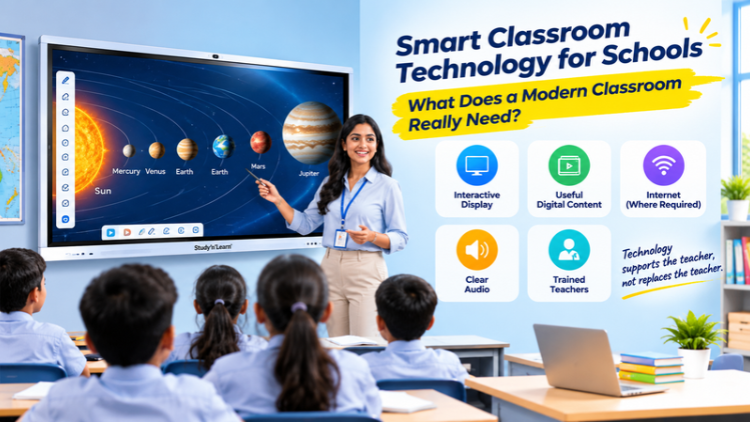
What Is a Smart Classroom?

5 Important Things a Modern Classroom Needs
1. An Interactive Display for Teaching

2. Useful Digital Learning Content

3. Reliable Internet and Connectivity

4. Proper Audio and Classroom Setup

5. Teachers Who Know How to Use the Technology

How Does an Interactive Flat Panel Help Teachers?

Does Every School Need an Expensive Smart Classroom?

How to Choose the Right Technology for Your School

Introducing Studynlearn Interactive Flat Panels

Studynlearn Interactive Flat Panels are among the best options for Indian schools looking for a cost-effective yet high-performance digital teaching solution. These panels are designed to enhance classroom learning with integrated K-12 digital content and advanced AI features.
They offer a 4K UHD display for crystal-clear visuals, supporting interactive and engaging lessons. With multi-touch functionality, multiple students can interact simultaneously, promoting collaboration and active learning. The panels come preloaded with educational content, making them ideal for various subjects.
Additionally, they include a 3-year on-site warranty, ensuring long-term peace of mind for schools. The energy-efficient design further helps reduce electricity costs, making them a smart investment for schools.
Key Features of Studynlearn Interactive Flat Panels:
- 4K UHD Display: Offers superior clarity for immersive learning.
- Google EDLA: Google EDLA Certified Interactive Flat Panels.
- SNL Board: In-built SNL board with numerous Interactive and AI tools for interactive learning and teaching. Made In-house with a team of 155 members.
- Operating System: Latest Android 16 with an octa-core processor
- Multi-Touch Support: Allows multiple students to interact simultaneously.
- Preloaded Educational Content: Ready-to-use, curriculum-aligned content.
- Camera and Mic: In-built camera and mic for video conferencing and online classes
- 3-Year On-Site Warranty: Ensures long-term reliability.
- Energy-Efficient Design: Helps reduce electricity costs.
Studynlearn SNL Board

The Studynlearn Interactive Flat Panel comes with an integrated SNL Board, a powerful education-focused platform developed by Studynlearn’s dedicated in-house team of 155+ professionals to make classroom teaching more efficient, engaging, and personalized.
Designed to support the Indian curriculum, the SNL Board provides complete K–12 content, AI courses, 3D models, interactive teaching tools, and rich teacher resources that enhance the learning experience.
Teachers can instantly create lesson plans, quickly search topics, generate question papers for classes 1 to 12, and download them in document or PDF format, significantly reducing their workload.
Students benefit from virtual science experiments, real-life educational videos, and practical examples related to their subjects, making complex concepts easier to understand and learning more interactive and effective.
Key Features of Studynlearn SNL Board:
- Curriculum-Focused: Provides step-by-step solutions aligned with the Indian curriculum.
- Multilingual Support: Available in English, Hindi, and various regional languages.
- Fast Content Generation: Creates chapter-wise notes within three days.
- Smart Write: Write content in multiple languages, use text recognition to convert handwritten text into clear and readable digital text, and transform standard text-based equations into properly formatted mathematical formulas.
- K–12 Content: Integrated with comprehensive K–12 educational content.
- Interactives: Practice virtual experiments in Mathematics, Physics, Chemistry, and Biology.
- 3D Models: 3D models for Mathematics, Physics, Chemistry, Biology, and Social Science.
- AI Course: 80+ AI tools, step-by-step learning along with illustrative books.
- Instant Lesson Planning: Enables quick topic searches and question paper generation.
- Vast Resource Library: Offers access to over 6,50,000 questions.
Conclusion
Frequently Asked Questions (FAQs)
A smart classroom is a classroom that uses technology to support teaching and learning. It may include an interactive display, digital learning content, internet access, speakers and other useful equipment. Teachers can use these tools to show pictures, videos, presentations and diagrams during lessons. Students can also interact with digital content when the classroom equipment supports it. However, a smart classroom does not need every available technology. Schools should choose equipment based on their teaching needs, classroom size and budget. The main purpose is to make teaching more useful and easier to understand.
A modern smart classroom may need an interactive display, useful educational content, suitable connectivity, audio equipment and trained teachers. An interactive display allows teachers to show lessons and write on a large screen. Digital content provides pictures, videos, diagrams and presentations for different subjects. Internet access can help teachers use online resources, while speakers help students hear audio clearly. Schools may also need proper mounting and electrical arrangements. The exact equipment depends on the classroom size, student strength, teaching methods and available budget. Not every school needs the same setup.
A digital board helps teachers display and explain lessons using a large screen. Teachers can show presentations, pictures, videos and diagrams to the whole class. Depending on the model, they can also write notes, draw shapes, solve questions and interact with content directly on the screen. For example, a science teacher can display a diagram of the human body, while a mathematics teacher can solve equations step by step. This gives teachers another way to explain topics. The usefulness depends on the quality of the content and how the teacher uses the display.
An interactive flat panel is not compulsory for every school, but it can be a useful teaching tool. It allows teachers to display lessons, videos, images and other digital content on a large touchscreen. Some models also support writing, drawing and student interaction. Before purchasing one, schools should consider their teaching needs, classroom size, student strength and budget. They should also check the available software, connectivity, warranty and service support. A school can introduce technology gradually instead of buying every piece of equipment at once. The right setup depends on what will be useful in everyday teaching.
A smart board gives teachers another way to explain lessons using digital content. They can display presentations, educational videos, diagrams and images on a large screen. Depending on its features, teachers can also write notes, draw pictures and solve questions directly on the display. For example, a geography teacher can show a map, while a science teacher can use an animation to explain a topic. These tools can support different teaching activities. However, teachers still play the main role in the classroom. Technology works best when it is used with good lesson planning and clear explanations.
A smart classroom can use many features without an internet connection, but internet access can provide additional options. Teachers may use offline presentations, saved videos, downloaded learning material and supported applications without going online. An internet connection can help them access websites, online videos, cloud resources and web-based learning tools. The need for internet depends on the school's teaching methods and the software being used. Schools should also check whether the interactive display supports the required connections. A good classroom setup should meet teaching needs even when internet access is not available.
The cost of setting up a smart classroom in India depends on the equipment selected and the number of classrooms involved. Important factors include the interactive display, screen size, audio equipment, installation, connectivity, software and other accessories. Some schools may only need a touchscreen display and basic teaching content, while others may require a more complete setup. Teacher training and technical support should also be considered. There is no single price that suits every school. Institutions should first prepare a list of their requirements and then request detailed quotations from suppliers.
Teachers can use digital technology in many subjects. In mathematics, they can display equations, shapes and step-by-step solutions. In science, they can show diagrams, educational videos and animations. Geography teachers can use maps and images to explain different places, while English teachers can display reading material, vocabulary and presentations. History teachers can show pictures and videos related to important events. These activities can help teachers explain topics in different ways. However, the digital material should match the lesson and students' learning needs. Technology should support teaching, not distract students from it.
Schools should first check the screen size and display quality to make sure students can see the content clearly. They should also examine the touchscreen features, operating system, memory, storage and available software. Connectivity options such as HDMI, USB and wireless screen sharing may be useful for connecting other devices. Warranty, installation and after-sales service are also important. Schools should ask the supplier for complete product specifications and a detailed quotation. They should compare products based on actual classroom requirements rather than choosing only the cheapest or most expensive option.
Schools can train teachers by starting with the basic functions of the classroom equipment. Teachers should learn how to switch on the display, open applications, write on the screen, show presentations and connect other devices. They can then practise using digital content for different subjects. Schools should provide simple instructions and allow teachers time to practise before using the technology in regular lessons. Technical support should also be available when problems occur. Regular practice can help teachers become more comfortable with the equipment. The goal is to make technology a useful part of daily teaching.
