AI Smart Board vs Projector: Which Classroom Technology Makes More Sense?
Interactive Flat Panels
September,08 2026
Mohammad Hamzah
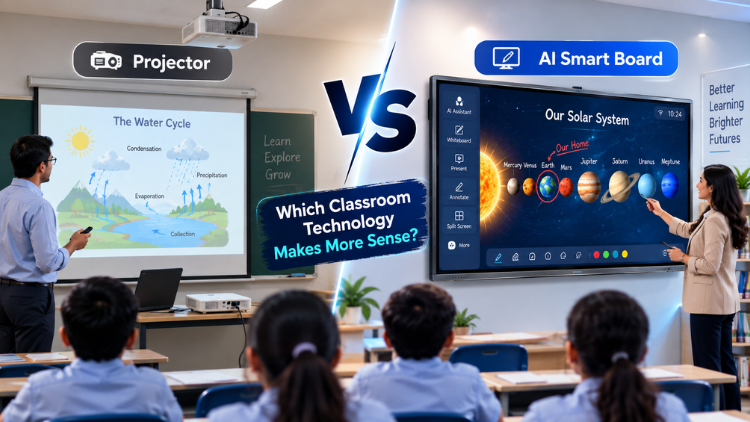
AI Smart Board vs Projector at a Glance

What Is an AI Smart Board?

What Is a Classroom Projector?

AI Smart Board vs Projector: Key Differences

| Features | AI Smart Board | Projector |
| Built-in Display | Yes | No |
| Touch Interaction | Available | Usually needs additional hardware |
| Digital Annotation | Built-in on supported models | Usually needs additional equipment/software |
| AI Capabilities | Available on supported models | Usually depends on connected systems |
| Multimedia Teaching | Yes | Yes |
| Bright-Room Visibility | Generally more consistent | Varies with room and model |
| Projection Shadows | No | Possible |
| Interactive Collaboration | Strong | More setup-dependent |
| Hybrid Teaching | Supported with compatible camera/audio | Requires additional equipment |
| Maintainance | Display/software required | Depends on projector technology |
1. Interaction and Student Participation

2. Display Quality and Classroom Visibility
3. Teaching and Digital Annotation
4. AI and Intelligent Classroom Features
5. Hybrid and Remote Learning
Installation, Maintenance and Long-Term Usability

Which Technology Makes More Sense for Different Classrooms?

- Interactive smart classrooms: An AI smart board is often the stronger fit when lessons depend on touch, annotation and collaboration.
- Presentation-focused classrooms: A projector can remain sensible when the main requirement is displaying slides, videos, and documents, especially where projection infrastructure already exists.
- Hybrid classrooms: An interactive flat panel with AI may be preferable when integrated camera and audio workflows are important, but schools should evaluate the complete setup.
- Budget-conscious institutions: Compare total cost of ownership, not just purchase price. Installation, accessories, maintenance, and upgrades can change long-term economics.
- Collaborative learning environments: Direct touchscreen interaction can be valuable when students regularly solve problems, annotate content, or participate at the display.
What Should Schools Consider Before Choosing?

- Classroom size: Match display size and viewing distance to the room.
- Teaching style: Consider whether lessons are presentation-led or activity-based.
- Required interaction: Decide how important direct touch and annotation are.
- Display visibility: Evaluate brightness, contrast, and viewing conditions.
- Ambient lighting: Check natural and artificial light.
- AI requirements: Identify functions teachers will actually use.
- Hybrid teaching: Assess camera, microphone and conferencing needs.
- Existing infrastructure: Review computers, cabling, mounts and projection equipment.
- Installation: Consider wall space, mounting and room layout.
- Maintenance: Compare service requirements and support.
- Teacher training: Ensure staff can use the system confidently.
- Total cost of ownership: Include accessories, service and upgrades.
- Warranty and support: Check coverage and technical assistance.
Introducing Studynlearn Interactive Flat Panels

Studynlearn Interactive Flat Panels are among the best options for Indian schools looking for a cost-effective yet high-performance digital teaching solution. These panels are designed to enhance classroom learning with integrated K-12 digital content and advanced AI features.
They offer a 4K UHD display for crystal-clear visuals, supporting interactive and engaging lessons. With multi-touch functionality, multiple students can interact simultaneously, promoting collaboration and active learning.
The panels come preloaded with educational content, making them ideal for various subjects. Additionally, they include a 3-year on-site warranty, ensuring long-term peace of mind for schools. The energy-efficient design further helps in reducing electricity costs, making them a smart investment for schools.
Key Features of Studynlearn Interactive Flat Panels:
- 4K UHD Display: Offers superior clarity for immersive learning.
- Google EDLA: Google EDLA-certified interactive flat panels.
- SNL Board: In-built SNL board with numerous Interactive and AI tools for interactive learning and teaching. Made In-house with a team of 155 members.
- Operating System: Latest Android 16 with an octa-core processor
- Multi-Touch Support: Allows multiple students to interact simultaneously.
- Preloaded Educational Content: Ready-to-use, curriculum-aligned content.
- Camera and Mic: Built-in camera and mic for video conferencing and online classes
- 3-Year On-Site Warranty: Ensures long-term reliability.
- Energy-Efficient Design: Helps reduce electricity costs.
Studynlearn SNL Board

The Studynlearn Interactive Flat Panel comes with an integrated SNL Board, a powerful education-focused platform developed by Studynlearn’s dedicated in-house team of 155+ professionals to make classroom teaching more efficient, engaging, and personalized.
Designed to support the Indian curriculum, the SNL Board provides complete K–12 content, AI courses, 3D models, interactive teaching tools, and rich teacher resources that enhance the learning experience. Teachers can instantly create lesson plans, quickly search topics, generate question papers for classes 1 to 12, and download them in document or PDF format, significantly reducing their workload.
Students benefit from virtual science experiments, real-life educational videos, and practical examples related to their subjects, making complex concepts easier to understand and learning more interactive and effective.
Key Features of Studynlearn SNL Board:
- Curriculum-Focused: Provides step-by-step solutions aligned with the Indian curriculum.
- Multilingual Support: Available in English, Hindi, and various regional languages.
- Fast Content Generation: Creates chapter-wise notes within three days.
- Smart Write: Write content in multiple languages, use text recognition to convert handwritten text into clear and readable digital text, and transform standard text-based equations into properly formatted mathematical formulas.
- K–12 Content: Integrated with comprehensive K–12 educational content.
- Interactives: Practice virtual experiments of Mathematics, Physics, Chemistry, and Biology.
- 3D Models: 3D models for Mathematics, Physics, Chemistry, Biology, and Social Science.
- AI Course: 80+ AI tools, step-by-step learning along with illustrative books.
- Instant Lesson Planning: Enables quick topic searches and question paper generation.
- Vast Resource Library: Offers access to over 6,50,000 questions.
- Custom Content: Allows users to upload PDFs and create personalized study materials.
Conclusion
Frequently Asked Questions (FAQs)
An AI smart board can be more suitable than a projector for classrooms where interactive teaching, direct touch interaction, digital annotation, multimedia content, and collaboration are priorities. Unlike a projector, an interactive display does not require a separate projection surface and allows teachers to interact directly with content on the screen. Depending on the model, AI features may include voice recognition, intelligent camera functions, handwriting recognition, gesture recognition, or AI-assisted audio. However, a projector can still be practical for presentation-focused environments. The right choice depends on classroom requirements, budget, infrastructure, teaching methods, and expected usage.
An AI smart board is a direct-view interactive display that combines a touchscreen, computing capabilities, connectivity, and potentially AI-powered functions. A classroom projector works by projecting an image from a separate device onto a wall or projection screen. The major difference is interaction: teachers can directly write, annotate, and interact with content on a smart board, while projection-based systems generally require additional interactive hardware for similar functionality. Projectors can provide large images and remain useful for presentation-focused classrooms. Schools should compare visibility, interaction, installation, maintenance, software, and total ownership requirements before choosing.
In many modern classrooms, an interactive flat panel with AI can replace the role traditionally performed by a projector because it provides a large built-in display for presentations, videos, digital textbooks, websites, and other content. It can also add touchscreen interaction and, on supported models, AI-assisted features such as intelligent cameras, voice interaction, handwriting recognition, and audio processing. However, whether replacement makes sense depends on the school's requirements. Projectors may remain appropriate where very large projected images, existing infrastructure, or specific budget considerations are important. Schools should evaluate the complete classroom setup rather than comparing only display technologies.
An AI smart board generally provides more direct classroom interaction because teachers and students can interact with digital content through the touchscreen. They can write, annotate, move objects, solve problems, and participate in interactive activities directly on the display. Depending on the model, AI capabilities may add voice, gesture, handwriting, or intelligent camera functions. A projector primarily displays content, although interactive projection systems can add touch or pen-based functionality through additional equipment. For schools focused on collaborative and interactive teaching, a touchscreen display may provide a more integrated experience. The final decision should consider teaching style and classroom needs.
Maintenance requirements depend on the specific product, installation, and usage environment. An interactive flat panel generally avoids some projector-specific considerations, such as projection alignment and maintaining a separate projection surface. A projector setup may require attention to mounting, alignment, ventilation, light-source technology, cables, and the projection surface. Interactive panels still require software updates, connectivity management, physical care, and technical support. Schools should therefore compare the complete maintenance requirements rather than assuming either technology is maintenance-free. Warranty coverage, service availability, installation quality, expected lifespan, and technical support should all be included when evaluating long-term ownership.
An interactive flat panel with AI can be particularly useful for hybrid classrooms when paired with compatible cameras, microphones, conferencing software, and reliable internet connectivity. Supported AI camera functions may include auto-framing, speaker tracking, or participant detection, while AI-assisted audio may improve voice pickup and reduce unwanted background noise. A projector can also support hybrid teaching, but additional equipment such as a webcam, microphone, speakers, and computer may be required. The quality of a hybrid classroom ultimately depends on the entire technology ecosystem. Schools should evaluate connectivity, room acoustics, camera placement, conferencing compatibility, and teacher training alongside the display.
Yes. Projectors can still be useful where schools primarily need large-screen presentation capabilities and already have suitable projection infrastructure. They can display presentations, videos, documents, and other multimedia content effectively when the projector, room lighting, and projection surface are appropriately configured. However, they generally do not provide the same integrated touchscreen experience as modern interactive displays. Schools that prioritize direct annotation, student interaction, collaboration, or AI-assisted classroom functions may prefer an interactive display. Projectors therefore remain a valid classroom technology option, particularly when their capabilities align with the institution's teaching methods, infrastructure, budget, and intended use.
An interactive flat panel with AI may provide several intelligent capabilities depending on the manufacturer and model. These can include voice or speech recognition, intelligent camera processing, auto-framing, speaker tracking, AI-assisted microphones, noise reduction, gesture recognition, handwriting recognition, and smart annotation. Some systems may also integrate AI-powered software tools for content assistance or classroom collaboration. Schools should carefully distinguish between features built into the panel and capabilities that require additional hardware, software, internet access, or subscriptions. Because AI functionality varies significantly, buyers should request detailed specifications and conduct a practical demonstration before selecting a particular system.
Schools should begin by identifying how teachers will use the technology rather than starting with a particular product. Important considerations include classroom size, student strength, teaching style, display visibility, ambient lighting, interaction requirements, multimedia needs, hybrid learning, existing infrastructure, installation, maintenance, and budget. An AI smart board may be appropriate when direct touchscreen interaction, digital annotation, collaboration, and intelligent classroom features are important. A projector may be suitable for presentation-focused environments with established projection infrastructure. Schools should also compare total cost of ownership, warranty, technical support, and teacher training before making a final decision.
An AI smart board can be a worthwhile investment when its capabilities address genuine classroom requirements. It can combine a large interactive display with digital annotation, multimedia teaching, connectivity, and selected AI features, potentially reducing the need for multiple classroom devices. However, schools should not choose an AI-enabled system simply because it includes advanced technology. Display quality, touch responsiveness, software compatibility, infrastructure, teacher training, warranty, technical support, and total cost of ownership remain important. The value of AI ultimately depends on how effectively teachers use its capabilities. A requirement-based evaluation and live product demonstration can help schools determine whether the investment makes practical sense.
