Digital Board for Classroom: Complete Guide to Interactive Learning in 2026
Interactive Flat Panels
August,05 2026
Mohammad Hamzah
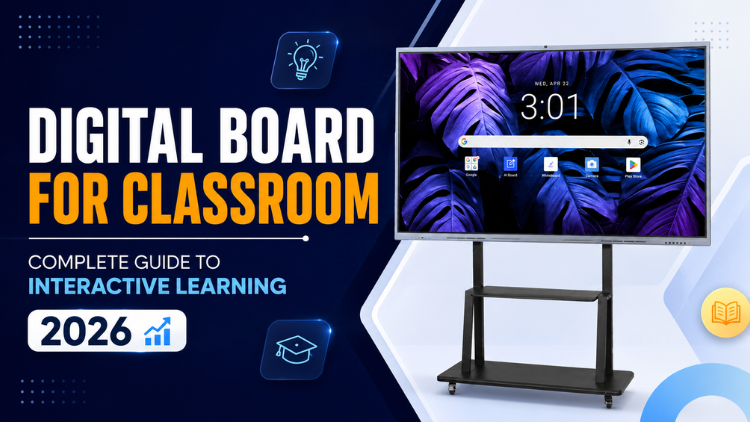
What Is a Digital Board for Classroom?

How Does It Work?
- A high-resolution touchscreen display
- Built-in Android operating system
- Internet connectivity
- Interactive annotation software
- Screen-sharing capabilities
- Multimedia support for videos, presentations, and educational apps
Why Schools Are Adopting It

Why Smart Boards Are Transforming Modern Teaching
Interactive Lessons
Multimedia Integration
Greater Student Participation
Real-Time Annotation
Internet Connectivity
Collaborative Learning
Support for Hybrid Education
Personalized Learning
Essential Features to Look for in a Digital Board

- 4K UHD display for clear visuals and readable content
- Multi-touch functionality that supports simultaneous interaction
- Screen sharing from laptops, tablets, and smartphones
- Built-in Android operating system for standalone operation
- Annotation tools for writing over documents and presentations
- Eye-care technology that reduces eye strain during long sessions
- Built-in speakers for multimedia teaching
- Compatibility with educational software and classroom applications
- Security features to protect school data
- Regular software updates for improved performance and new features
Digital Board for Classroom vs Traditional Whiteboard

| Feature | Digital Board for Classroom | Traditional Whiteboard |
| Student engagement | Interactive participation | Mostly passive learning |
| Teaching flexibility | Multimedia, internet, annotation | Writing only |
| Multimedia support | Videos, images, presentations | Not available |
| Collaboration | Multi-user interaction | Limited |
| Lesson preparation | Digital and reusable | Manual preparation |
| Resource sharing | Instant cloud sharing | Physical notes only |
| Assessment methods | Interactive quizzes and activities | Manual evaluation |
| Long-term educational value | Supports evolving classroom technology | Limited scalability |
How to Choose the Right Smart Board for Teaching

- Understand classroom requirements. Consider the age group, teaching style, and subjects being taught.
- Select the appropriate screen size. Larger classrooms typically benefit from bigger displays for better visibility.
- Compare software compatibility. Ensure the board supports commonly used educational platforms and classroom applications.
- Evaluate warranty and technical support. Reliable after-sales service helps minimize classroom disruptions.
- Consider future scalability. Choose solutions that can integrate with Smart Classroom Solutions and other Educational Technology platforms.
Common Challenges and How to Overcome Them

Initial Adoption
Teacher Training
Internet Connectivity
Classroom Setup
Device Maintenance
Content Preparation
The Future of Interactive Learning in 2026 and Beyond

Introducing Studynlearn Interactive Flat Panels

Studynlearn Interactive Flat Panels are among the best options for Indian schools looking for a cost-effective yet high-performance digital teaching solution. These panels are designed to enhance classroom learning with integrated K-12 digital content and advanced AI features.
They offer a 4K UHD display for crystal-clear visuals, supporting interactive and engaging lessons. With multi-touch functionality, multiple students can interact simultaneously, promoting collaboration and active learning. The panels come preloaded with educational content, making them ideal for various subjects.
Additionally, they include a 3-year on-site warranty, ensuring long-term peace of mind for schools. The energy-efficient design further helps in reducing electricity costs, making them a smart investment for schools.
Key Features of Studynlearn Interactive Flat Panels:
- 4K UHD Display: Offers superior clarity for immersive learning.
- Google EDLA: Google EDLA Certified Interactive Flat Panels.
- SNL Board: In-built SNL board with numerous Interactive and AI tools for interactive learning and teaching. Made In-house with a team of 155 members.
- Operating System: Latest Android 16 with Octa core Processor
- Multi-Touch Support: Allows multiple students to interact simultaneously.
- Preloaded Educational Content: Ready-to-use, curriculum-aligned content.
- Camera and Mic: In-built camera and mic for video conferencing and online classes
- 3-Year On-Site Warranty: Ensures long-term reliability.
- Energy-Efficient Design: Helps reduce electricity costs.
Studynlearn SNL Board

The Studynlearn Interactive Flat Panel comes with an integrated SNL Board, a powerful education-focused platform developed by Studynlearn’s dedicated in-house team of 155+ professionals to make classroom teaching more efficient, engaging, and personalized.
Designed to support the Indian curriculum, the SNL Board provides complete K–12 content, AI courses, 3D models, interactive teaching tools, and rich teacher resources that enhance the learning experience. Teachers can instantly create lesson plans, quickly search topics, generate question papers for classes 1 to 12, and download them in document or PDF format, significantly reducing their workload.
Students benefit from virtual science experiments, real-life educational videos, and practical examples related to their subjects, making complex concepts easier to understand and learning more interactive and effective.
Key Features of Studynlearn SNL Board:
- Curriculum-Focused: Provides step-by-step solutions aligned with the Indian curriculum.
- Multilingual Support: Available in English, Hindi, and various regional languages.
- Fast Content Generation: Creates chapter-wise notes within three days.
- Smart Write: Write content in multiple languages, use text recognition to convert handwritten text into clear and readable digital text, and transform standard text-based equations into properly formatted mathematical formulas.
- K–12 Content: Integrated with comprehensive K–12 educational content.
- Interactives: Practice virtual experiments of Mathematics, Physics, Chemistry, and Biology.
- 3D Models: 3D models for Mathematics, Physics, Chemistry, Biology, and Social Science.
- AI Course: 80+ AI tools, step by step learning along with illustrative books.
- Instant Lesson Planning: Enables quick topic searches and question paper generation.
- Vast Resource Library: Offers access to over 6,50,000 questions.
- Custom Content: Allows users to upload PDFs and create personalized study materials.
Conclusion
Frequently Asked Questions (FAQs)
A digital board for classroom is an interactive touchscreen display that combines multimedia, internet connectivity, and collaboration tools to make lessons more engaging. Teachers can display presentations, videos, educational apps, and live annotations while students interact directly with the screen. Unlike traditional boards, it supports visual and collaborative learning, making complex topics easier to understand. A smart board for teaching also allows teachers to save lesson notes, share resources digitally, and integrate online learning platforms. These features create an interactive learning environment that improves participation, knowledge retention, and overall classroom effectiveness.
Schools are adopting digital boards because they support interactive teaching, multimedia learning, and better classroom collaboration. Traditional whiteboards are limited to handwritten notes, while a digital board for classroom enables teachers to integrate videos, animations, online resources, and educational software into lessons. This helps students stay engaged and improves conceptual understanding. A smart board for teaching also simplifies lesson planning by allowing teachers to save, edit, and reuse digital content. As schools embrace smart classroom initiatives and digital education, interactive displays have become an essential teaching tool.
When choosing a smart board for teaching, look for a 4K UHD display, multi-touch capability, fast response time, wireless screen sharing, built-in Android operating system, annotation tools, cloud integration, eye-care technology, and compatibility with educational software. Built-in speakers, microphones, and regular software updates also improve the teaching experience. Schools should also evaluate warranty coverage and after-sales support. A well-equipped digital board for classroom provides long-term value by supporting interactive learning, teacher productivity, and future-ready classroom environments.
A digital board for classroom is often used as a broad term for interactive teaching displays, while an interactive flat panel refers to the hardware technology used in many modern smart classrooms. Most interactive flat panels function as digital boards by offering touchscreen interaction, multimedia support, wireless connectivity, and collaboration tools. A smart board for teaching built on interactive flat panel technology delivers high-resolution visuals, responsive touch performance, and advanced classroom features. Understanding this distinction helps schools compare solutions based on functionality rather than terminology alone.
Yes. A digital board for classroom is designed to support both traditional and hybrid education. Teachers can conduct live virtual classes, annotate digital documents in real time, share presentations, record lessons, and connect with video conferencing platforms. Students attending remotely receive the same learning materials as those in the classroom, ensuring continuity in education. A smart board for teaching also integrates with cloud-based applications, allowing educators to access lesson plans and teaching resources from different devices. This flexibility makes digital boards ideal for modern learning environments.
A smart board for teaching encourages students to participate through interactive quizzes, multimedia presentations, drag-and-drop exercises, educational games, and collaborative problem-solving activities. Visual demonstrations help explain difficult concepts more effectively than static teaching methods. Students can also interact directly with the display, promoting active learning rather than passive observation. A digital board for classroom supports different learning styles by combining text, images, videos, and animations, resulting in better classroom participation, improved understanding, and stronger knowledge retention.
Yes. A digital board for classroom is suitable for subjects such as mathematics, science, languages, social studies, computer education, commerce, and the arts. Teachers can use simulations, graphs, videos, maps, presentations, and interactive activities to simplify lessons and improve student understanding. A smart board for teaching also allows educators to adapt their teaching methods for different age groups and learning levels. This flexibility makes digital boards valuable tools for schools, colleges, coaching institutes, and training centres across a wide range of academic disciplines.
A smart board for teaching provides long-term educational and operational benefits. It improves lesson delivery, enhances student engagement, supports collaborative learning, reduces dependence on printed materials, and enables teachers to reuse digital lesson content. Schools also benefit from simplified classroom management and greater flexibility in delivering hybrid education. A digital board for classroom helps institutions prepare students for technology-driven learning environments while improving teaching efficiency. Over time, these advantages contribute to stronger educational outcomes and better use of classroom resources.
Schools should begin by assessing classroom size, teaching requirements, software compatibility, connectivity options, display quality, touch performance, warranty, and technical support. Requesting demonstrations and comparing educational features helps decision-makers evaluate practical usability. A smart board for teaching should not be selected based solely on specifications; it should also align with teaching methods and long-term educational goals. Choosing a scalable solution ensures that the technology remains useful as classroom requirements evolve and digital learning continues to expand.
A digital board for classroom supports the transition from traditional teaching to technology-enabled education by combining interactive content, cloud connectivity, multimedia resources, and collaborative learning tools. It enables teachers to create engaging lessons while helping students develop digital literacy, communication, and problem-solving skills. A smart board for teaching also prepares educational institutions for hybrid learning models and evolving classroom technologies. As education increasingly embraces digital transformation, interactive classroom displays play a central role in building future-ready learning environments that benefit both educators and students.
