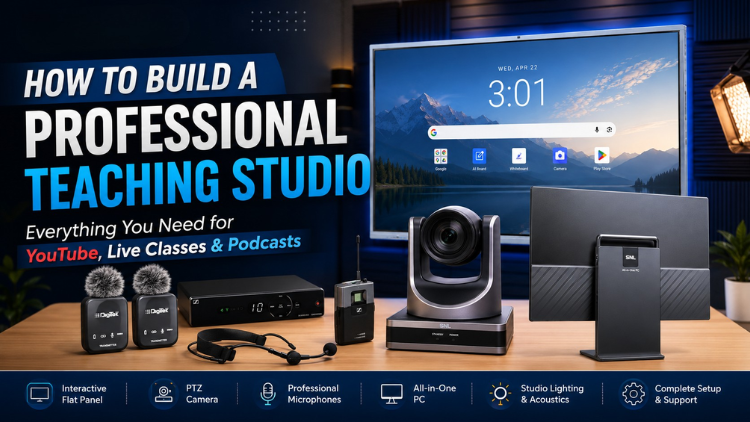
How to Build a Professional Teaching Studio: Everything You Need for YouTube, Live Classes & Podcasts
Interactive Flat Panels
|
August,25 2026
|
Mohammad Hamzah
Creating professional educational videos is no longer limited to large YouTubers, production houses, or expensive media studios. Teachers, educators, coaching institutes, schools, universities, and content creators can now build a professional studio setup that allows them to record high-quality educational videos, conduct live classes, stream on YouTube, create reels, record podcasts, and produce engaging digital content from one dedicated space.
A ready-to-use studio setup combines an interactive flat panel, PTZ camera, professional microphone, All-in-One PC, monitoring screen, studio lighting, acoustics, and other essential equipment into one integrated solution. Once installed and configured, the setup can be operated by the user without requiring a technical team every time a video needs to be recorded.
Studynlearn provides a complete studio solution that combines hardware, software, installation, and training, making it easier for educators and institutions to create professional-quality content.
What Is a Professional Studio Setup?
A professional studio setup is an integrated recording and teaching environment designed for creating high-quality videos, online classes, live streams, podcasts, reels, and other digital content.
Instead of purchasing and connecting different devices separately, a complete setup brings the major components together. The interactive display becomes the teaching surface, the PTZ camera captures the presenter, the microphone records clear audio, the PC manages recording and streaming, while lighting and acoustic treatment improve the overall production quality.
This makes the studio suitable for multiple applications, including:
Online teaching and live classes
YouTube educational videos
Explainer and presentation videos
Coaching and training content
Instagram Reels and YouTube Shorts
Green-screen videos
Podcast recording
Live streaming
Recorded lectures and presentations
The same studio can be configured according to the creator's requirements and can support different content formats without requiring a completely separate recording environment.
Interactive Flat Panel: The Heart of the Studio
One of the most important components of the setup is the Interactive Flat Panel, which acts as the digital teaching board inside the studio.
An educator can write directly on the panel, explain diagrams, display images, play videos, present PowerPoint presentations, open documents, and annotate PDFs while recording. This makes the teaching experience much more visual and engaging compared with simply speaking in front of a camera.
A modern AI Interactive Flat Panel can further support technology-driven teaching environments where digital content, interactive learning resources, and smart classroom tools become part of the teaching workflow.
The Studynlearn Interactive Flat Panel is available in different sizes, including:
55-inch
65-inch
75-inch
86-inch
98-inch
The ideal size depends on the room and the intended use. A 75-inch panel can be a practical choice for many studio environments because it provides a large teaching surface while creating a premium visual background.
For institutions building an AI Smart Classroom, the interactive panel can also become the central display through which teachers present digital learning material and explain concepts visually.
PTZ stands for Pan, Tilt and Zoom. Unlike a conventional fixed camera, a PTZ camera can be remotely controlled to move from left to right, up and down, and zoom in or out.
This gives the presenter greater flexibility while recording. The camera can be positioned to capture the teacher, interactive panel, or a wider studio frame depending on the type of content being produced.
A 4K PTZ camera can provide high-quality video capture for:
Educational videos
Online classes
YouTube content
Live streaming
Presentations
Podcasts
Reels and short-form videos
Because the camera can be controlled remotely, the presenter does not need to physically adjust it between recordings.
Video quality alone cannot make educational content professional. Clear audio is equally important.
The studio setup includes professional microphone options, including collar microphones that allow educators to move freely while teaching. A microphone with noise cancellation can help produce cleaner and more understandable voice recordings.
This is particularly important for online education because students need to clearly hear explanations, instructions, and discussions.
The microphone can be connected directly to the studio's central computer system, allowing audio settings to be managed during recording or live streaming.
Depending on the application, different microphone configurations can also be selected. For podcasting, multiple microphones can be used so that the host and guests can be recorded separately.
All-in-One PC: The Control Centre
The All-in-One PC functions as the central control system of the studio.
The camera and microphone can be connected to the PC, while recording and streaming can be managed through software such as OBS Studio. From this central system, the user can control recording settings, audio settings, streaming configurations, and other production requirements.
The PC can also be used for:
Recording videos
Live streaming
Managing camera and microphone inputs
Editing videos
Publishing content
Managing live interactions
This makes the PC an essential part of the complete studio workflow rather than simply another computer.
For creators who want to operate the studio independently, having the major controls available from one location can make the entire recording process considerably easier.
Monitor for Live Preview and Teleprompter Use
A dedicated monitor gives the presenter a live view of the recording.
During a recording, the presenter can check whether they are correctly positioned inside the frame, whether the interactive panel is visible, and whether the overall video composition looks right.
The monitor can also help identify problems such as excessive or insufficient lighting and framing issues before the final video is published.
Another useful application is teleprompter functionality. The presenter can use the monitor to follow prepared content while speaking naturally toward the camera.
During live classes and streams, the monitor can also be used to observe comments, questions, and audience interactions, allowing the educator to respond to students in real time.
Studio Lighting for a Professional Look
Even high-quality cameras cannot deliver professional-looking footage without appropriate lighting.
Proper studio lighting helps the presenter appear bright and clear while reducing unwanted shadows. It also ensures that the interactive panel and teaching content remain clearly visible on camera.
Different lighting options can be incorporated into a studio depending on the room and production requirements.
These may include:
Flicker-free ceiling lights
Umbrella lights
Softbox lights
Tube lights
Stand-mounted studio lights
The lighting configuration can be customized according to the studio size and the type of videos being recorded.
For an AI Smart Board or interactive panel-based teaching environment, balanced lighting is particularly important because the presenter and the content displayed on the screen both need to remain visible without creating distracting reflections or excessively bright areas.
Soundproofing and Acoustic Treatment
Professional video production is not only about cameras and displays. The acoustic environment of the room has a major impact on audio quality.
Acoustic materials can help reduce unwanted echo, reverberation, and sound reflections inside the studio.
Depending on the room, materials such as:
Carpets
Thick curtains
Fabric panels
Acoustic foam panels
can be used to improve the acoustic environment.
Soundproofing serves a different purpose. It helps reduce external sounds entering the recording room, such as traffic, construction activity, conversations, and other surrounding noise.
The level of soundproofing required depends on the size of the room and the specific recording requirements.
Green Screen Recording
A complete studio setup can also support green-screen production.
A green background can be created behind the presenter or around the interactive panel, allowing the background to be removed during post-production and replaced with another visual environment.
This can be useful for educators who want to create:
Explainer videos
Virtual backgrounds
Presentation videos
Educational animations
Promotional content
Creative short-form videos
The same studio can therefore be adapted for both conventional teaching videos and more visually creative productions.
One Studio for Reels, Shorts and Educational Videos
A professional studio does not have to be restricted to long-form YouTube videos.
The PTZ camera and recording system can also be used to create content in short-form formats such as Instagram Reels and YouTube Shorts.
Instead of maintaining separate equipment for every content format, creators can use the same studio and adjust the recording and framing according to the required output.
This makes the setup useful for educators and institutions that want to maintain an active presence across multiple digital platforms.
Complete Podcast Studio Setup
The studio can also be configured for professional podcast production.
A podcast setup generally requires multiple camera angles so that the host and guest can be captured independently while another camera provides the main frame showing both participants.
For example, a three-camera configuration can include:
A camera focused on the guest
A camera focused on the host
A main camera showing both host and guest
Multiple All-in-One PCs can be used to manage the individual camera feeds according to the configuration.
The microphone setup can also be expanded for multiple participants. A two-transmitter microphone system can accommodate a host and one guest, while additional microphones can be added when more guests participate.
This allows the same studio environment to function as both an educational recording studio and a podcast production space.
Installation, Software and Training Included
Building a professional studio is not simply about purchasing equipment. Every component needs to be installed, connected, configured, and tested properly.
Studynlearn's complete studio solution includes three important elements:
1. Recording and Live Streaming Software
The required recording and streaming software is provided as part of the studio setup, allowing users to record videos and conduct live sessions.
2. Professional Installation
The installation team visits the customer's location to install the different studio components, connect the equipment, and complete the overall setup.
3. Complete Training
Users are trained on how each component works, how to start and operate the equipment, and which important settings need to be configured.
This is especially useful for educators who want to operate the studio themselves rather than depending on a technician for every recording.
Support is also provided to help resolve studio-related issues after installation.
Why Choose a Complete Studio Setup?
A complete studio setup provides more than individual recording equipment. It creates a dedicated content production environment where multiple types of digital content can be created from one location.
With the right configuration, an educator can:
Teach using an interactive flat panel
Record high-quality educational videos
Conduct live online classes
Stream directly to YouTube
Create reels and short videos
Use a teleprompter
Record podcasts
Produce green-screen videos
Monitor live audience interactions
Edit and publish content
For schools and educational institutions, the same infrastructure can support the development of an AI Smart Classroom and digital teaching ecosystem.
A Complete Solution for Modern Content Creation
A professional studio setup brings together display technology, video recording, audio, computing, lighting, acoustics, and software into one coordinated environment.
Whether the goal is to create educational YouTube videos, conduct online classes, build an AI-enabled teaching environment, record podcasts, produce reels, or stream live sessions, the setup can be configured around the creator's specific requirements.
With the combination of an interactive flat panel, PTZ camera, professional microphone, All-in-One PC, monitoring system, lighting, acoustic treatment, installation, software, and training, educators can have a ready-to-use studio where they simply enter, switch on the system, and start creating.
If you are planning to build your own professional studio setup within a defined budget, contact Studynlearn to discuss your requirements and explore the right configuration for your space.
Call Studynlearn at 89270-89270 for studio setup details.
Frequently Asked Questions (FAQs)
A professional studio setup can include an interactive flat panel, PTZ camera, professional microphone, All-in-One PC, monitor, studio lighting, acoustic treatment, soundproofing, and recording or streaming software. The exact configuration can be customized according to the room, budget, and intended use. Studynlearn also provides installation and training so users can learn how to operate the complete setup.
Yes. A studio setup can be used to create online classes, recorded lectures, YouTube educational videos, and live teaching sessions. The interactive flat panel allows teachers to write, display diagrams, explain presentations, annotate documents, and show videos while the PTZ camera records the lesson.
Studynlearn offers interactive flat panels in 55-inch, 65-inch, 75-inch, 86-inch, and 98-inch sizes. The appropriate size depends on the studio dimensions and intended use. A 75-inch panel can be an ideal choice for many studio environments because it provides a large teaching surface and creates a strong visual presence in the background.
PTZ means Pan, Tilt and Zoom. A PTZ camera can be remotely moved horizontally and vertically and can zoom in or out. This allows presenters to change framing without physically adjusting the camera. It can be used for educational videos, live classes, YouTube content, podcasts, and other professional recordings.
Acoustic treatment helps reduce echo, reverberation, and unwanted sound reflections inside the room. Materials such as carpets, thick curtains, fabric panels, and acoustic foam can improve the audio environment. Soundproofing is also used when external noise such as traffic, construction, or conversations needs to be reduced.
Yes. The studio can be configured for podcast production using multiple cameras and microphones. A three-camera setup can capture the host, guest, and a combined frame. Additional microphones can also be added when more guests participate.
Yes. The same studio can be used for short-form content. The camera setup and framing can be adjusted according to the required format, allowing educators and creators to produce reels, YouTube Shorts, and other vertical video content without creating a completely separate studio.
Yes. According to the studio setup solution described in the provided material, Studynlearn's support team can visit the customer's location, install the different components, connect the equipment, and complete the studio setup.
Yes. Complete training is provided on the operation of the studio. Users can learn how individual components work, how to start the system, which important settings need to be configured, and how the overall setup can be operated for recording and streaming.
You can contact Studynlearn to discuss your room, content requirements, and budget and determine the appropriate studio configuration. The setup can be designed for educational videos, online teaching, podcasts, reels, green-screen production, and live streaming. For more information, call 89270-89270.
We use cookies to enhance your browsing experience and analyze site traffic. By clicking "Accept All", you consent to our use of cookies as described in our Privacy Policy.