StudynLearn AI Classroom: The Future of Interactive & AI-Powered Teaching
Interactive Flat Panels
|
September,23 2026
|
Mohammad Hamzah
Classrooms are changing. Today, teaching is no longer limited to writing on a traditional board and asking students to copy notes. Teachers can use videos, animations, interactive activities, digital resources, AI-powered tools, and real-time demonstrations to make even complex concepts easier to understand.
This is where StudynLearn AI Classroom comes in. It combines the power of the StudynLearn Interactive Flat Panel with intelligent AI-powered teaching software and extensive K–12 learning content to create a more engaging digital learning environment.
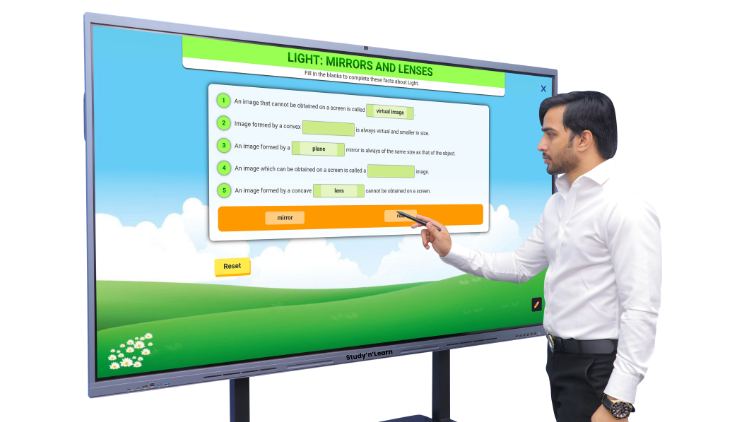
At the heart of this setup is an interactive flat panel with AI, designed to help teachers explain concepts visually, interact with students, access digital resources, and use AI assistance whenever required.
What Makes StudynLearn AI Classroom Different?
StudynLearn AI Classroom brings hardware and intelligent software together in one teaching ecosystem. The Interactive Flat Panel works as a powerful digital board where teachers can display images, animations, videos, presentations, documents and quizzes.
Integrated StudynLearn AI adds another layer of functionality. Teachers can search for topics, explore related information, access explanations and use AI assistance to solve questions and equations step by step.
The platform also provides K–12 learning content from nursery to Class 12, including 2 lakh+ learning resources, 50,000+ animated videos, 1 lakh+ practice questions, and 10,000+ games and learning tools.
Together, these features help schools build an AI smart classroom where technology supports teachers and encourages students to participate more actively.
A 4K Display Designed for Classroom Learning
The StudynLearn Interactive Flat Panel features a 4K Ultra HD display, allowing teachers to present detailed educational content with clarity.
From science diagrams and geography maps to videos, presentations and documents, high-resolution visuals can make classroom explanations easier to follow. Students sitting farther from the panel can also view the displayed content clearly.
The panel is powered by an Octa-Core Processor, supporting multiple applications and learning tools during lessons.
Interactive Learning with 50-Point Multi-Touch
A digital classroom becomes more engaging when students can participate instead of simply watching.
With 50-point multi-touch, multiple users can interact with the panel. Teachers can conduct quizzes, group activities, problem-solving exercises, and collaborative learning sessions.
This makes the panel more than a display; it becomes an interactive teaching surface.
AI-Powered Teaching Assistance
An AI smart board can provide teachers with more than traditional display and writing functions. With StudynLearn AI integrated into the panel, teachers can explore questions, equations and topics using AI-powered assistance.
For example, a teacher can search for a topic and access relevant explanations, visuals, videos, quizzes, and supporting information. Mathematical questions can also be explored through step-by-step solutions.
This can help teachers quickly find supporting material while keeping lessons focused and interactive.
The panel combines several features designed for everyday classroom use.
It comes with 8GB DDR5 RAM and 128GB storage, supporting multitasking and storage of compatible files and resources. Android and Windows operating system options are available, allowing schools to choose a configuration according to their requirements. Android 14 and Android 16 options are also available.
The panel also includes a 48MP camera and built-in microphone, supporting online classes, video calls and live teaching sessions with compatible applications.
Built-in speakers provide audio for educational videos and other multimedia content, while HDMI Out allows the panel's content to be displayed on another compatible screen.
Teachers can use the Annotation Tool to write over documents, highlight information, select different pen colours, and adjust pen thickness.
With Screen Recording, teachers can record lessons and save them for sharing with students later.
Split Screen allows teachers to display two sources simultaneously, for example, showing a visual while explaining it. Teachers can also take Screenshots, crop specific areas and import them into the whiteboard.
Other built-in utilities include Wi-Fi, Bluetooth, hotspot, HDMI switching, brightness and volume controls, along with everyday tools such as Calculator, Calendar, Clock and Notes.
Interactive Tools for Student Participation
StudynLearn also includes tools designed specifically for classroom interaction.
With Voter, teachers can create questions and options, allow students to participate by scanning a QR code and view voting results.
FastFile allows files to be imported quickly using a QR code, while TouchLock can temporarily lock the touchscreen.
The Freeze function can pause the current screen so teachers can annotate, zoom in or zoom out without changing the displayed content.
Magnifier can enlarge specific content, while Spotlight can highlight a particular area and darken the surrounding background to focus students' attention.
The PIP (Picture-in-Picture) feature can display another source, such as HDMI or OPS content, in a resizable window while another application is being used.
Natural Touch and Durable Design
The panel features Fast & High-Precision Touch for responsive writing, drawing and annotation. Its Zero Bonding Technology reduces the gap between the display and touch layers, helping create a more natural touch experience.
For durability, the panel features 4mm toughened anti-glare glass designed to handle regular classroom use while reducing reflections from lights and windows. Its stated screen life is 60,000 hours.
Teachers can also use shortcut buttons for functions such as recording, volume control, Eye Care, settings, return, and power.
Schools can install the panel on a wall for a fixed teaching setup or use a compatible movable stand when greater flexibility is required. A movable stand can also allow height adjustment and easier repositioning.
Conclusion
StudynLearn AI Classroom brings together interactive hardware, AI-powered teaching assistance, digital learning content, and practical classroom tools.
From 4K visuals and 50-point multi-touch to AI-assisted explanations, annotation, screen recording, voting, magnification and split-screen functionality, the StudynLearn Interactive Flat Panel is designed to support different teaching styles and classroom activities.
For schools looking to move beyond traditional teaching methods, this combination of an interactive flat panel with AI, digital content and intelligent teaching tools offers a technology-driven approach to creating more visual, interactive, and engaging learning experiences.
For More Information, call or WhatsApp us on: 89270-89270.
Frequently Asked Questions (FAQs)
StudynLearn AI Classroom is a digital teaching solution that combines the StudynLearn Interactive Flat Panel with StudynLearn AI and K–12 educational content. It enables teachers to explain lessons using videos, animations, images, presentations, documents, quizzes and interactive tools. The system also provides AI-assisted topic exploration and step-by-step solutions for questions and equations. Its Interactive Flat Panel includes features such as a 4K display, 50-point multi-touch, built-in camera and microphone, annotation, screen recording, split screen, voting, magnification and other classroom utilities.
An interactive flat panel with AI combines touchscreen display technology with AI-powered software. Unlike a conventional display, it allows teachers to write, annotate, interact with content and use digital teaching applications directly on the screen. When AI is integrated, teachers can additionally use AI-powered features for topic exploration, explanations, question solving and educational content discovery. StudynLearn AI Classroom combines these capabilities to provide teachers with a single environment for digital teaching, interactive activities and AI-supported classroom learning.
StudynLearn AI is designed to provide AI-powered assistance during teaching. Teachers can search for topics and access related explanations, images, videos, quizzes and other information. It can also help solve questions and equations through step-by-step solutions. This can be useful when teachers need additional supporting material during a lesson. Instead of replacing the teacher, the AI functions as a digital teaching support tool that can help educators explore concepts and create more interactive explanations for students.
The StudynLearn Interactive Flat Panel offers a range of classroom-focused features, including a 4K Ultra HD display, Octa-Core Processor, 50-point multi-touch, 48MP camera, built-in microphone, speakers, HDMI Out, 8GB DDR5 RAM and 128GB storage. It also provides Android and Windows operating system options. Additional features include Zero Bonding Technology, fast touch response, 4mm toughened anti-glare glass, screen recording, annotation, split screen, screenshot, voting, magnifier, spotlight, freeze, PIP, Wi-Fi, Bluetooth and hotspot connectivity.
An AI smart classroom can give teachers more ways to present and explain information. Instead of relying only on written notes, teachers can use interactive digital content, videos, animations, quizzes and AI-supported explanations. Students can participate through touchscreen activities, voting and collaborative exercises. Features such as annotation, spotlight, magnifier and split screen can also help teachers focus attention on specific parts of a lesson. The effectiveness of these tools depends on how teachers integrate them into their teaching methodology and classroom activities.
An AI smart board is an interactive digital board that combines touchscreen functionality with AI-powered software and educational tools. It can support activities such as writing, annotation, multimedia presentations, quizzes and AI-assisted learning. Depending on the software, teachers may also use AI for topic exploration and question solving. StudynLearn AI Classroom combines an Interactive Flat Panel with StudynLearn AI, allowing teachers to use both interactive classroom tools and AI-powered teaching assistance from the same setup.
The 50-point multi-touch feature allows multiple touch interactions on the Interactive Flat Panel. This can support classroom activities where more than one student needs to interact with the screen. Teachers can use it for group activities, quizzes, problem-solving exercises and collaborative learning. Rather than using the panel only as a display, students can actively interact with educational content. The usefulness of multi-touch depends on the application being used and whether that application supports multiple simultaneous touch inputs.
Yes. The StudynLearn Interactive Flat Panel includes a screen-recording feature that allows teachers to record what is displayed and taught on the screen. A teacher can use this feature to capture a lesson and save the recording in the required folder. Recorded lessons can potentially be shared with students later, depending on the school's workflow and the supported file-sharing method. This can be useful for revision, students who missed a lesson, or creating a digital record of classroom explanations.
The Spotlight, Freeze and Magnifier tools are designed to help teachers focus students' attention during lessons. Spotlight can highlight a selected portion of the screen while reducing the visibility of the surrounding content. Freeze can pause the displayed screen so teachers can annotate, zoom or explain content without changing the original display. Magnifier allows teachers to enlarge selected content, including using different magnification levels. These tools can be particularly useful when explaining detailed diagrams, maps, documents or small visual elements.
Yes. The StudynLearn Interactive Flat Panel can be installed as a wall-mounted classroom display or used with a compatible movable stand. A wall mount provides a fixed installation position, which can work well for classrooms with a dedicated teaching wall. A movable stand can provide greater flexibility because the panel can be repositioned and its height can be adjusted. Schools can select the installation approach according to their classroom layout, teaching requirements and available space.
We use cookies to enhance your browsing experience and analyze site traffic. By clicking "Accept All", you consent to our use of cookies as described in our Privacy Policy.