What Is a Smart Board and How Does It Work?
Interactive Flat Panels
June,04 2026
Mohammad Hamzah
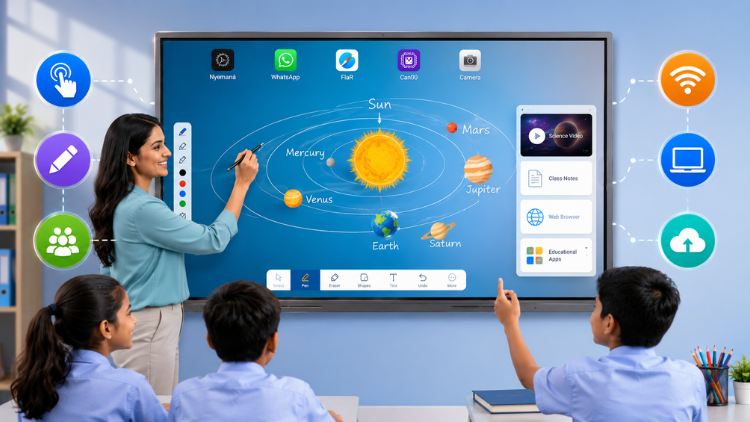
What Is a Smart Board?

How Does a Smart Board Work?

- Write notes digitally
- Open presentations
- Zoom into diagrams
- Move objects on screen
- Play educational videos
- Access online learning resources
Key Features of a Smart Board

Multi-Touch Functionality
High-Resolution Display
Digital Whiteboard
Wireless Screen Sharing
Built-In Educational Software
Internet Connectivity
Smart Board vs Traditional Whiteboard

| Feature | Traditional Whiteboard | Smart Board |
|
Writing |
Yes | Yes |
| Multi-Media Support | No | Yes |
| Internet Access | No | Yes |
| Video Playback | No | Yes |
| Interactive Learning | No | Yes |
How Teachers Use Smart Boards in Classrooms

Mathematics
Science
English Language Learning
Social Studies
Group Activities
Benefits for Students and Teachers
Benefits for Teachers
- Easier lesson delivery
- Better classroom management
- Access to multimedia content
- Faster assessments
- Ability to save and share lessons
Benefits for Students
- Increased engagement
- Improved visual learning
- Better collaboration
- Interactive participation
- Enhanced understanding of complex topics
Why Schools Are Choosing Interactive Panels

- No projector maintenance
- Brighter display quality
- Lower long-term operating costs
- Faster startup time
- Better touch accuracy
- Longer lifespan
How to Choose the Right Smart Board

Screen Size
Touch Technology
Display Quality
Software Compatibility
Built-In Features
Support and Warranty
Introducing Studynlearn Interactive Flat Panels

Studynlearn Interactive Flat Panels are among the best options for Indian schools looking for a cost-effective yet high-performance digital teaching solution. These panels are designed to enhance classroom learning with integrated K-12 digital content and advanced AI features.
They offer a 4K UHD display for crystal-clear visuals, supporting interactive and engaging lessons. With multi-touch functionality, multiple students can interact simultaneously, promoting collaboration and active learning. The panels come preloaded with educational content, making them ideal for various subjects.
Additionally, they include a 3-year on-site warranty, ensuring long-term peace of mind for schools. The energy-efficient design further helps in reducing electricity costs, making them a smart investment for schools.
SNL Board: Studynlearn panels come with an integrated SNL Board designed to enhance classroom teaching. It offers complete K–12 content, AI course, 3D models, interactive tools, and rich teacher resources to make lessons more engaging and effective. Teachers can easily generate question papers for classes 1 to 12 and download them in document or PDF format.
Students can perform virtual science experiments, watch real-life videos, and explore practical examples related to their topics, making learning more interactive and easier to understand.
Key Features of Studynlearn Interactive Flat Panels:
- 4K UHD Display: Offers superior clarity for immersive learning.
- Google EDLA: Google EDLA Certified Interactive Flat Panels.
- AI Board: In-built AI board with numerous Interactive tools for interactive learning and teaching. Made In-house with a team of 155 members.
- Operating System: Latest Android 16 with Octa core Processor
- Multi-Touch Support: Allows multiple students to interact simultaneously.
- Preloaded Educational Content: Ready-to-use, curriculum-aligned content.
- Camera and Mic: Built-in camera and mic for video conferencing and online classes
- 3-Year On-Site Warranty: Ensures long-term reliability.
- Energy-Efficient Design: Helps reduce electricity costs.
Studynlearn AI – Personalized Learning for Indian Classrooms

Studynlearn has developed its own education-focused AI, designed to make teaching more efficient and personalized. Built by a dedicated in-house team, this AI offers step-by-step support tailored to the Indian curriculum.
It provides instant lesson planning, quick topic searches, and even question paper generation, significantly reducing teachers' workload.
Key Features of Studynlearn AI:
- Curriculum-Focused: Provides step-by-step answers for Indian classrooms.
- Expert Development: Created by a 155-member in-house team.
- Multilingual Support: Available in English, Hindi, and regional languages.
- Instant Lesson Planning: Quick topic searches and paper generation.
- Vast Resource Library: Access to 6,50,000+ questions.
- Custom Content: Upload PDFs for personalized study materials.
- Fast Content Generation: Creates chapter-wise notes in three days.
Conclusion
Frequently Asked Questions (FAQs)
A smart board is used to make classroom teaching more interactive, engaging, and effective. Teachers can display lessons, write notes, play videos, run educational applications, and access online resources directly from the screen. Unlike traditional boards, a smart board allows real-time interaction through touch technology, helping students participate actively in lessons. Schools use smart boards for subjects such as mathematics, science, languages, and social studies. Modern interactive panel solutions also support collaborative learning, digital assessments, and multimedia-based instruction, making them valuable tools for today's smart classrooms.
A smart board works through touch-sensitive technology that allows users to interact directly with digital content displayed on the screen. Teachers can write, draw, move objects, open presentations, and browse educational resources using their fingers or a stylus. Most modern interactive panel systems include built-in Android software and internet connectivity, eliminating the need for external devices. The board processes touch inputs instantly and displays content in high resolution. This functionality helps teachers create interactive lessons while enabling students to participate actively in classroom activities and discussions.
The primary difference is functionality. A traditional whiteboard only allows manual writing and erasing, while a smart board combines digital teaching tools, multimedia content, internet access, and interactive learning features. Teachers can save lessons, annotate presentations, conduct quizzes, and display videos directly on a smart board. A modern interactive panel also offers touchscreen capabilities, wireless sharing, and collaboration tools. These features improve student engagement and learning outcomes. As schools adopt digital education strategies, smart boards provide significantly more value than conventional whiteboards.
Schools are increasingly choosing an interactive panel because it provides better performance, reliability, and visual quality than projector-based systems. Unlike projectors, an interactive panel delivers bright, clear images without shadows, glare, or maintenance issues related to bulbs and filters. It starts instantly and supports multi-touch interaction, making lessons more dynamic and collaborative. Many modern smart board solutions now use interactive panel technology because it offers longer lifespan, lower maintenance costs, and a better user experience for both teachers and students in modern classrooms.
A smart board helps teachers deliver lessons more efficiently while increasing student engagement. Teachers can combine text, images, videos, animations, and online resources into a single lesson. They can also save classroom notes, conduct interactive assessments, and share learning materials digitally. Modern interactive panel solutions reduce preparation time and simplify classroom management. By providing access to multimedia tools and collaborative features, a smart board supports diverse teaching methods and helps educators explain complex topics more effectively, creating a richer learning experience for students.
A smart board improves learning by making lessons more visual, interactive, and engaging. Students can participate directly by touching the screen, solving problems, and interacting with digital content. Visual demonstrations, educational videos, and interactive activities help students understand concepts more easily. A modern interactive panel also supports collaborative learning, allowing multiple students to work together on classroom tasks. This increased participation often leads to better knowledge retention, improved comprehension, and higher engagement levels, making smart boards valuable tools for student-centered education.
Yes, many modern smart board systems can operate without an external computer. Most advanced interactive panel models come with built-in Android operating systems that allow users to access applications, browse the internet, open files, and conduct lessons directly from the display. Teachers can use whiteboarding tools, educational software, and cloud-based resources without connecting a separate device. However, schools can still connect laptops or desktops when additional software or specialized applications are required. This flexibility makes smart boards convenient and easy to use in classrooms.
When selecting a smart board, schools should evaluate screen size, touch responsiveness, display quality, software compatibility, and connectivity options. A high-quality interactive panel should offer 4K resolution, multi-touch support, wireless screen sharing, and built-in educational tools. Schools should also consider durability, warranty coverage, and technical support from the provider. Features such as cloud integration, lesson recording, and collaboration tools can further enhance classroom effectiveness. Choosing the right smart board ensures long-term value and supports the institution's digital learning goals.
Yes, a smart board can benefit schools, colleges, coaching centers, universities, and corporate training environments. The technology adapts to different teaching methods and educational requirements. Whether used in primary education, higher education, or professional training programs, a smart board enhances communication, collaboration, and engagement. Modern interactive panel solutions support various educational applications, making them suitable for classrooms of all sizes. Their versatility and ease of use have made smart boards an essential component of technology-enabled learning environments worldwide.
StudynLearn provides advanced smart board and interactive panel solutions designed specifically for educational institutions. These solutions combine high-quality displays, responsive touch technology, educational software, and classroom-friendly features that support effective teaching and learning. StudynLearn products help schools create engaging smart classrooms while simplifying lesson delivery and student collaboration. With reliable support, innovative technology, and a focus on educational outcomes, StudynLearn has become a trusted partner for schools seeking future-ready classroom solutions that improve teaching efficiency and student engagement.
