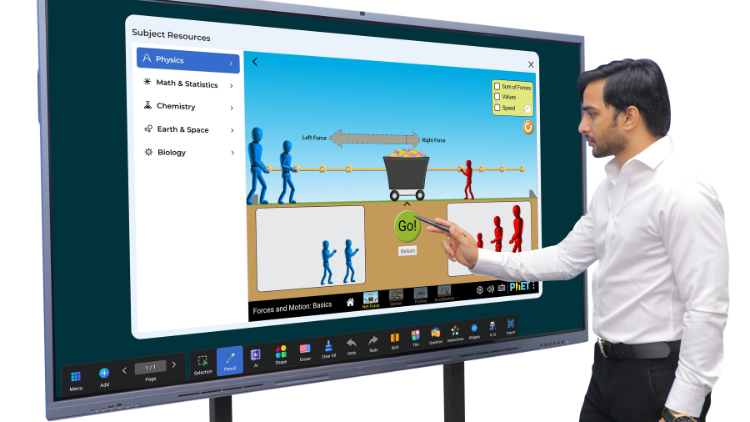
StudynLearn AI Classroom: How AI-Powered Interactive Flat Panels Are Transforming Modern Teaching
Interactive Flat Panels
|
September,17 2026
|
Mohammad Hamzah
Imagine a classroom where students can see complex science diagrams come alive, explore geography through interactive maps, solve mathematical equations step by step with AI, and participate in quizzes directly on the classroom screen. Instead of relying only on textbooks and traditional blackboards, teachers can now use technology to make learning more visual, engaging, and interactive.
This is the idea behind the StudynLearn AI Classroom, a modern teaching environment that combines powerful interactive hardware with intelligent AI-powered learning software.
With the StudynLearn Interactive Flat Panel and integrated StudynLearn AI, teachers can explain concepts using images, animations, videos, presentations, documents, quizzes, and a wide range of digital tools. The result is a more flexible teaching experience where technology supports educators and students throughout the learning process.
But what exactly makes an AI-powered classroom different from a traditional digital classroom? And how can an interactive flat panel with AI help teachers deliver better lessons? Let’s explore.
What Is StudynLearn AI Classroom?
StudynLearn AI Classroom is a combination of interactive digital classroom hardware and AI-powered educational software designed to support teaching and learning.
At the centre of this setup is the StudynLearn Interactive Flat Panel, a smart digital board that allows teachers to display, write, draw, annotate, and interact with educational content on a large touchscreen.
Along with the panel, teachers get access to StudynLearn AI, an AI-powered teaching software that helps with topic exploration, explanations, question solving, and learning activities.
Together, these technologies create an AI-smart classroom where teachers can move beyond traditional board-based teaching and introduce a more engaging, technology-supported learning experience.
How Does StudynLearn AI Help Teachers?
The integrated StudynLearn AI software is designed to make lesson preparation and classroom explanations more convenient.
Teachers can use it to:
Explore topics and access related educational information.
Get explanations for questions and mathematical equations.
Understand solutions through step-by-step guidance.
Discover relevant images, videos, and quizzes.
Use digital resources to explain difficult concepts.
For example, while teaching a mathematics lesson, a teacher can use AI to explore an equation and understand its solution step by step. During a science lesson, the teacher can search for supporting visuals and educational resources to make the explanation easier to understand.
The AI does not replace the teacher. Instead, it works as a digital teaching assistant that can support lesson delivery and help educators make classroom explanations more interactive.
Why Schools Need an AI Smart Classroom
Traditional teaching methods remain valuable, but modern classrooms can benefit from combining them with digital learning tools. Students learn through different methods, and visual content, interactive activities, and multimedia explanations can provide additional ways to understand a topic.
An AI smart classroom helps teachers bring these resources together in one teaching environment.
1. Make Difficult Concepts Easier to Understand
Some subjects are challenging to explain using only written notes. Topics such as human anatomy, geometry, physics, geography, and chemistry often become easier to explore when students can see diagrams, animations, and visual examples.
With an interactive flat panel, teachers can display educational images, videos, presentations, and documents on a large screen. They can also write directly over the content and highlight important information.
This allows students to connect theoretical explanations with visual learning.
2. Encourage Student Participation
A classroom should not be limited to students listening and copying notes. Interactive teaching encourages learners to participate in activities, discussions, and problem-solving exercises.
The StudynLearn Interactive Flat Panel features 50-point multi-touch technology, allowing multiple touch interactions at the same time. Teachers can use this capability for group activities, quizzes, and collaborative learning exercises.
Students can interact with content rather than simply watching it, helping create a more participatory classroom environment.
3. Support Different Teaching Styles
Every teacher has a different way of explaining concepts. Some prefer diagrams, others use presentations, videos, examples, or live demonstrations.
An AI smart board brings these teaching methods together through one digital platform. Teachers can switch between writing, multimedia content, educational applications, and AI-supported explanations according to the lesson requirements.
This flexibility makes it easier to adapt teaching methods to different subjects and classroom activities.
StudynLearn Interactive Flat Panel: Powerful Features for Modern Classrooms
The StudynLearn Interactive Flat Panel is designed to support daily classroom teaching through a combination of display technology, processing performance, touch interaction, connectivity, and built-in audio-visual features.
Let’s look at its key features.
4K Ultra HD Display for Clear Visual Learning
The panel comes with a 4K Ultra HD display that delivers sharp and detailed visuals.
Teachers can use the high-resolution screen to show:
Science diagrams and educational illustrations.
Geography maps and classroom presentations.
Educational videos and animations.
Documents, images, and digital learning content.
Clear visuals are especially useful when explaining detailed diagrams or displaying content to students seated at the back of the classroom.
Octa-Core Processor for Smooth Performance
The Octa-Core Processor helps the panel run multiple applications and learning tools smoothly.
Teachers can open presentations, use educational applications, play videos, and access digital resources during lessons. This supports a more efficient classroom workflow, particularly when switching between different teaching activities.
50-Point Multi-Touch for Interactive Teaching
The 50-point multi-touch feature allows multiple touch interactions on the panel.
This can be useful for:
Group learning activities.
Interactive quizzes.
Collaborative problem-solving.
Digital writing and annotation.
Instead of making the classroom experience entirely teacher-led, the panel can support activities where students participate directly.
48MP Camera and Built-in Microphone
The panel includes a 48MP camera and built-in microphone to support online classes, video calls, and live teaching sessions.
Teachers can conduct virtual lessons directly through the panel, depending on the compatible software and setup being used.
The built-in audio-visual features help reduce the need for a separate camera and microphone arrangement for supported classroom activities.
Built-in Speakers for Audio-Visual Lessons
The panel comes with built-in speakers that allow teachers to play educational videos, animations, and other audio-visual content.
Clear audio is important when students are watching a video, listening to an explanation, or participating in an online class.
HDMI Out for External Display Support
With HDMI Out, teachers can display the panel’s content on another compatible display.
This can be useful in teaching environments where the same content needs to be shared with an additional screen.
8GB DDR5 RAM and 128GB Storage
The panel features 8GB DDR5 RAM and 128GB storage.
The RAM supports multitasking, while the storage provides space for saving compatible files, applications, and teaching resources.
Teachers can use the panel for presentations, classroom documents, digital content, and other supported learning materials.
Android can be used for regular digital teaching and classroom applications, while Windows can support PC-based software when the compatible configuration is selected.
Android 14 and Android 16 options are also available according to the product configuration. Schools can select the option that best matches their requirements.
Fast and High-Precision Touch
Writing and drawing on a digital board should feel natural. The panel’s fast touch response supports writing, drawing, and annotation activities.
Teachers can use the touchscreen to explain concepts, underline important points, solve problems, and make live notes during lessons.
Zero Bonding Technology for Natural Touch
Zero Bonding Technology reduces the gap between the display and touch layers.
This helps improve the alignment between the point where a teacher touches the screen and the content being displayed. As a result, writing and interaction can feel more natural and precise.
60,000 Hours Screen Life
The panel is designed with a screen life of 60,000 hours, supporting long-term classroom use.
For schools investing in digital teaching infrastructure, screen durability and long-term usability are important considerations.
Connectivity and Durable Screen Protection
The panel includes HDMI, touch, USB, and Type-C connectivity options for compatible devices such as computers, laptops, and other peripherals.
It also features 4mm toughened glass for additional screen protection. The anti-glare glass helps reduce reflections from classroom lights and windows, making the display more comfortable to view in different lighting conditions.
Smart Shortcut Buttons for Easier Classroom Control
Teachers often need to access important functions quickly during a lesson. The StudynLearn Interactive Flat Panel includes shortcut buttons that help simplify common operations.
These include:
Record: Start screen recording.
Volume controls: Adjust audio levels.
Eye Care: Turn the eye-care feature on or off.
Settings: Access settings quickly.
Return: Go back to the previous screen or application.
Power: Access the panel’s power controls.
These shortcuts can make it easier for teachers to manage the panel without interrupting the flow of their lessons.
Flexible Installation for Different Classrooms
Every classroom has different space and teaching requirements. The StudynLearn Interactive Flat Panel can be installed using a wall mount or a movable stand, depending on the selected setup.
A wall-mounted panel provides a fixed teaching position, while a compatible movable stand can offer flexibility in panel placement and height adjustment.
This allows schools to choose an installation approach that suits their classroom layout and teaching needs.
StudynLearn AI Classroom: A Complete Teaching Technology Solution
The real value of StudynLearn AI Classroom lies in the combination of hardware and software.
The Interactive Flat Panel provides the touchscreen, display, processing, connectivity, and audio-visual capabilities needed for modern digital teaching. StudynLearn AI adds intelligent learning support through topic exploration, explanations, question solving, and educational resources.
Along with the AI features, the StudynLearn platform provides K–12 learning content from nursery to Class 12, including:
More than 2 lakh learning resources.
More than 50,000 animated videos.
More than 1 lakh practice questions.
More than 10,000 games and tools for revision and learning activities.
These resources can support teachers in creating lessons that are more visual, engaging, and interactive.
The future of classroom teaching is not only about replacing traditional blackboards with digital screens. It is about creating learning environments where teachers have better tools to explain concepts and students have more opportunities to participate.
StudynLearn AI Classroom brings together an interactive flat panel with AI-powered teaching software, educational content, and classroom-friendly features. From 4K visual learning and multi-touch activities to AI-assisted explanations and K–12 resources, it is designed to support modern teaching requirements.
For schools looking to introduce AI smart classroom technology, the StudynLearn Interactive Flat Panel with AI offers a way to combine digital teaching, interactive learning, and intelligent software in one classroom solution.
Explore StudynLearn AI Classroom and discover how technology can support a more engaging learning experience.
For More Information, call or WhatsApp us on: 89270-89270.
Frequently Asked Questions (FAQs)
StudynLearn AI Classroom is a modern educational solution that combines the StudynLearn Interactive Flat Panel with AI-powered teaching software. It helps teachers explain concepts using digital content, interactive tools, educational videos, presentations, quizzes, and AI-assisted explanations. The system is designed to support classroom teaching from nursery to Class 12 through digital learning resources. Its interactive panel includes features such as a 4K display, multi-touch technology, built-in camera, microphone, and connectivity options. Schools can use the AI smart classroom setup to make lessons more visual, interactive, and technology-supported.
An interactive flat panel with AI helps teachers combine touchscreen teaching with intelligent digital learning support. Teachers can write, draw, annotate, display videos, show presentations, and access educational applications on the panel. The integrated AI software can assist with topic exploration, question solving, and step-by-step explanations. For example, a teacher explaining a mathematical equation can use AI-supported solutions to explore the working process. During science or geography lessons, digital visuals can make complex topics easier to demonstrate. The panel supports teaching activities while the teacher remains responsible for lesson delivery and student guidance.
An AI smart board is an interactive digital teaching display that combines touchscreen hardware with AI-powered software or learning tools. A traditional digital board may primarily display content, presentations, videos, or written notes. An AI smart board can additionally support intelligent features such as AI-assisted explanations, question solving, topic exploration, and access to related educational resources, depending on its software capabilities. StudynLearn AI Classroom combines the StudynLearn Interactive Flat Panel with StudynLearn AI, allowing teachers to use digital teaching tools and AI-supported learning resources in one classroom environment.
The StudynLearn Interactive Flat Panel includes several features designed for digital classroom teaching. These include a 4K Ultra HD display, Octa-Core Processor, 50-point multi-touch, 48MP camera, built-in microphone, speakers, HDMI Out, 8GB DDR5 RAM, and 128GB storage. The panel also supports Android and Windows operating system options according to the selected configuration. Additional features include fast and high-precision touch, Zero Bonding Technology, 60,000 hours of screen life, 4mm toughened glass, anti-glare protection, and multiple connectivity ports. These specifications support multimedia teaching, digital writing, online classes, and interactive learning activities.
Yes. StudynLearn AI Classroom is designed to support K–12 education, from nursery through Class 12. The StudynLearn platform provides educational content intended for different age groups and learning levels. According to the supplied product information, the content library includes more than 2 lakh learning resources, 50,000 animated videos, 1 lakh practice questions, and 10,000 games and tools for revision and learning activities. Teachers can use the Interactive Flat Panel to display relevant content for different subjects and classes. The available resources and features can vary according to the selected software package and product configuration.
An AI smart classroom can make lessons more engaging by combining visual content, interactive activities, multimedia explanations, and AI-supported learning tools. Teachers can display diagrams, animations, videos, presentations, and quizzes on a large touchscreen. The StudynLearn Interactive Flat Panel also supports 50-point multi-touch, which can be used for collaborative activities and student participation. For example, a science teacher can explain a concept using an animation, ask students to interact with a quiz, and use AI to explore additional information. These methods can provide students with more ways to engage with lessons than written notes alone.
StudynLearn AI is designed to help teachers explore questions and equations through step-by-step explanations. When a teacher enters a mathematical problem, the AI-powered software can assist in understanding the solution process, depending on the supported software functionality. This can be useful when explaining arithmetic, algebra, or other mathematical concepts in a classroom. Teachers can display the working on the Interactive Flat Panel and discuss each step with students. AI-generated solutions should be checked by the teacher, especially for complex problems, so that the final explanation is accurate and suitable for the students’ learning level.
Yes. The panel includes a 48MP camera and built-in microphone, which can support online classes, video calls, and live teaching sessions with compatible software and configuration. Teachers can use the panel to display teaching content while communicating with students through supported video-conferencing applications. The built-in speakers help play audio from videos and online lessons. The camera and microphone reduce the need for separate equipment for supported setups, although the exact online-class experience depends on the operating system, applications, internet connection, and selected product configuration. Schools should confirm software compatibility before setting up virtual teaching.
Zero Bonding Technology is a display construction method that reduces the gap between the display and touch layers. In an interactive flat panel, this can improve touch alignment and make writing or drawing feel more natural. When a teacher writes on the screen, the position of the digital ink should closely match the point of contact. A reduced gap between the layers can help improve this experience. StudynLearn Interactive Flat Panel includes Zero Bonding Technology to support fast and precise touchscreen interaction. The actual touch performance also depends on the panel’s hardware, software, and calibration.
Schools should consider their teaching requirements, classroom size, curriculum, software needs, and available infrastructure before choosing an AI smart classroom setup. Important factors include display resolution, touchscreen response, operating system options, camera and microphone features, connectivity, storage, and software compatibility. Schools should also review the educational content available for their classes and the AI features offered by the platform. StudynLearn AI Classroom combines the Interactive Flat Panel with AI-powered teaching software and K–12 learning resources. Schools can evaluate these features against their teaching goals and select the panel configuration and installation method that suit their classrooms.
We use cookies to enhance your browsing experience and analyze site traffic. By clicking "Accept All", you consent to our use of cookies as described in our Privacy Policy.