Studynlearn Studio Setup for Online Teaching: Build a Professional Digital Classroom
Interactive Flat Panels
September,25 2026
Mohammad Hamzah
What Is Included in the Studynlearn Studio Setup?

How Can You Use the Studio Setup for Online Teaching?

1. Deliver Lessons with an Interactive Flat Panel
2. Record Professional-Looking Lectures with a 4K PTZ Camera
3. Use a Dedicated Mic for Teaching for Clearer Voice Capture
4. Create Both Live and Recorded Classes
5. Monitor Your Teaching Workflow
Why Is Acoustic Treatment Important for Online Teaching?

Turn One Space Into a Complete Teaching Studio

Benefits of Having Your Own Recording Studio

Conclusion
Frequently Asked Questions (FAQs)
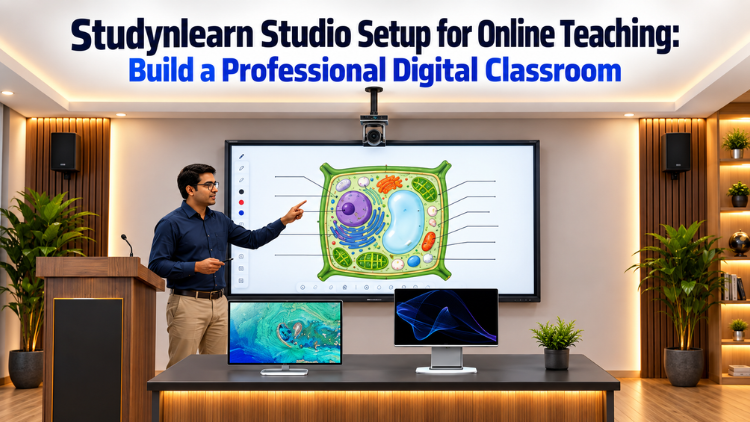
The StudynLearn Studio Setup is designed as a complete environment for online teaching, lecture recording, and digital learning. The core configuration includes one Interactive Flat Panel, generally 75 inches or according to the customer's requirement, one 4K PTZ Camera, one All-in-One PC, and one wireless microphone. Digitek or Sennheiser microphone options are available. The setup also includes two server monitors, while lighting and acoustic treatment are provided according to the requirements of the room and customer. This combination creates a dedicated space where educators can conduct lessons, record lectures, explain concepts visually, and create professional educational content.
The StudynLearn Studio Setup can be used to create both live and recorded online lessons. Teachers can use the Interactive Flat Panel as the main teaching screen to display educational content while explaining concepts. The 4K PTZ Camera can capture the teacher and teaching area, while the wireless microphone helps capture the teacher's voice. The All-in-One PC supports the overall teaching and recording workflow. With suitable lighting and acoustic treatment, educators can create a dedicated environment for regular online classes, recorded lectures, demonstrations, webinars, and other digital learning content without depending on an external recording space.
A 4K PTZ Camera is an important part of the StudynLearn Studio Setup because it can capture the teacher and teaching environment with high-resolution video. It can be positioned to show the educator, Interactive Flat Panel, or different parts of the teaching area according to the recording requirement. This is particularly useful when a teacher needs to move around while explaining a lesson instead of remaining fixed in front of a webcam. The brochure presents the PTZ Camera as one of the key components of the complete lecture recording studio, supporting professional lecture recording for online and hybrid learning.
Clear audio is essential when creating online educational content because students need to understand the teacher's explanations without unnecessary distractions. The StudynLearn Studio Setup includes a wireless mic for teaching, with Digitek or Sennheiser options. A wireless microphone allows the teacher to move around the teaching area while continuing to speak naturally. This can be particularly useful when explaining content on an Interactive Flat Panel. Along with acoustic treatment, a suitable mic for teaching can contribute to a more controlled recording environment. The microphone is therefore an important part of creating consistent and professional online lessons.
Yes, the StudynLearn Studio Setup can support both live online teaching and recorded educational content. The brochure specifically presents a Hybrid Lecture Studio for recording professional lectures for online and hybrid learning. Teachers can conduct live sessions while using the Interactive Flat Panel for visual explanations, or they can record lessons in advance for students to access later. The same environment can also be used for subject-wise modules, exam preparation, demonstrations, webinars, and educational videos. This allows educators to create a repeatable teaching and recording workflow instead of setting up equipment separately every time they need to teach.
The Interactive Flat Panel acts as the central visual teaching tool in the StudynLearn Studio Setup. Teachers can use it to display diagrams, educational material, charts, presentations, and other lesson content while explaining concepts on camera. The brochure's Smart Class Studio example shows a teacher using the Interactive Flat Panel to explain a plant-cell diagram to students. This demonstrates how the display can become part of an interactive teaching environment. A 75-inch panel is included as a standard configuration mentioned by the customer, while the panel size can be selected according to the specific requirements of the installation.
Acoustic treatment is included according to the room and customer requirements to create a more controlled audio environment. In an online teaching studio, unwanted background noise and room sound can affect the clarity of recorded lessons. When acoustic treatment is combined with a dedicated wireless mic for teaching, educators can create a more suitable environment for capturing their explanations. The StudynLearn configuration therefore allows acoustic treatment to be planned according to the specific space rather than using the same arrangement for every room. This can be particularly useful for educators who regularly record lectures and want a consistent environment for their digital content.
Yes. The brochure presents several applications for StudynLearn Studio solutions, including Smart Class Studio, Hybrid Studio, Podcast Studio, YouTube Studio, Green Screen Studio, and Conference Studio. This shows that the environment can be adapted for different content and communication requirements. An educator can use the same dedicated space for regular lessons, recorded lectures, YouTube educational videos, webinars, demonstrations, interviews, or other digital content, depending on the final configuration. With the Interactive Flat Panel, PTZ Camera, All-in-One PC, microphone, lighting, and acoustic treatment, the studio can function as a flexible content-creation environment for educators.
A dedicated recording studio can make the teaching and content-creation process more consistent. According to the StudynLearn brochure, having your own studio can reduce dependence on rented studio spaces and avoid concerns about external equipment availability. Educators can record lessons when required instead of arranging a separate location for every session. Once the equipment and teaching area are properly installed, the teacher can follow a repeatable workflow for preparing and recording content. The brochure also highlights recording at your convenience, saving time, and maintaining professional-grade video quality as key benefits of having a dedicated studio environment.
Yes. The configuration can be planned according to the customer's requirements. The Interactive Flat Panel can be 75 inches or another suitable size depending on the need. Lighting is provided according to the room and application, while acoustic treatment is also planned as required. The brochure presents different studio applications rather than limiting the solution to one fixed format, including Smart Class, Hybrid, Podcast, YouTube, Green Screen, and Conference Studio concepts. This makes it possible to plan the space around the educator's teaching style, room, recording requirements, and intended content. The final setup can therefore be adapted rather than following one identical configuration.
